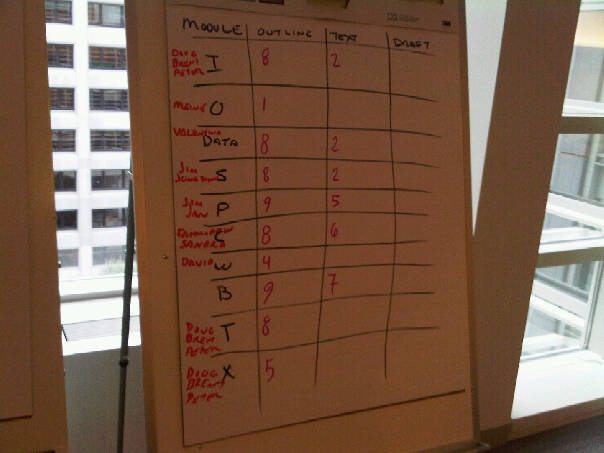
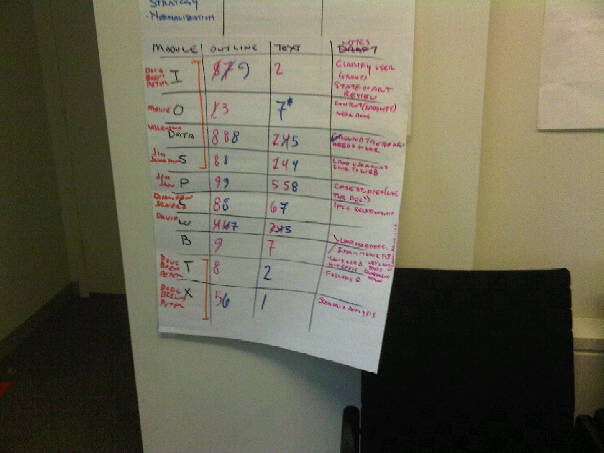
A visual control is anything that allows a group to see their progress, and understand its relative importance. To be sure, a kanban is a visual control, but there are nevertheless some limitations to it. The biggest limitation to a kanban is that it is linear. Work, especially knowledge work, is not always linear.At a recent WriteShop Tonianne and I ran at the World Bank, we set out to run the process with a kanban. It quickly became apparent that the linear flow of the kanban was not going to work with the rapid and recursive iterations of this particular project.This project set out initially to create a document in five days that was made up of several modules. When we started, each module was in a different state of completion. The original assumption was that there would be a workflow that went something like “concept,” “components,” “outline,” “draft,” and “final,” and we’d make a mission-based kanban for each module.What ended up happening was very different. Scientists from around the world sat down on Monday and, fully aware they were not ready to write, instead began to talk. Those discussions redefined what exactly was needed for each module. That was good.What was even better was the evolution – the discussion became a product development discussion. Who was the client? What did they really need? What could this group produce by the deadline?And suddenly we had a spreadsheet model the clients could use for doing the analysis described in the document. That model, in turn, drove an entire, organic, and rapid rethinking of the layout of the entire document. Suddenly we had coherence.Then … it was time to write. We set up a visual control that was deceptively simple. The control has 4 columns: “Module,” “Outline,” “Text,” and “Draft.” This was because we knew that the workflow was not going to be linear. As text was written in the document, it informed what else needed to be in the document. Therefore, some outline would be written, then some text, then the outline augmented, then more text, then some discussion, then more outline, and so on.This means there was no “pull” from outline to text. So we used numbers to mark a 1 to 10 level for “complete” and checked back a couple times a day, crossing out the old numbers and entering new ones.The “Draft” column quickly changed to an “Issues” column. This allowed us to have very detailed stand-up meetings (short 10 to 20 minute discussions) about status twice daily.At each stand-up, the numbers would be entered for each stage. Sometimes they would go down. If you look closely, you can see 8s go to 7s. The group found that amusing, but what was happening was they were learning more and more about what “Complete” in this particular context meant. Clarity for the deliverable was rising on a daily basis, even if the estimation of complete was falling.Some days the “text” ranking would go up, even as the ranking for the same module’s outline fell. People were writing text, discovering new needs, then noting that they weren’t yet incorporated in the outline.The visual control allowed us to build a type of kanban that we might call a “recursive kanban” - a visual control that allowed for the productive loops in knowledge work. Linear kanban has a hard time dealing with productive loops like this.
Managing and Working Through That Ever Growing Reading List
If you are anything like me, you will have a monster reading list. Do you manage it? Do you focus on a few books at a time? If not, maybe you should, to better enjoy that fiction or help manage your reading based learning?Problem - Too Many Books, Not Enough Time & Bad HabitsI have a lot of books waiting to be read thanks to a nasty '1-click' habit with Amazon, I also have a decent amount of quality reading time due to a lengthy commute, yet I just can't read them all soon enough, and the list keeps growing. Part of the problem is that until recently I had a bad habit of picking up books, reading a few hundred pages, getting distracted by another book, and before I know it I have five books on the go, which is plain silly. The result was a load of books I have finished, and a load I have touched on, yet not fully focused upon and completed. I asked myself - "If only I could drop this wasteful habit and focus on completing a few books at a time, the NET result would be different, namely, more books read and better understood over any period of time, with less wasteful unfocused reading and rereading".Solution - Enter the 'General Reading Personal Kanban'Funny name for this pattern right? Why not just "Reading Personal Kanban"? Well, I'm going with this one on the basis that I think there are two types of reading we do, an end-to-end style (General Reading), and for those that use various learning techniques, like a SQ3R, a 'SQ3R Personal Kanban' pattern is in the works, so expect a post soon. In the meantime, 'General Reading' can encompass anything factual or fictional, and I personally tend to carry one of each type of book with me.The root of the problem is one of focus and priority. If there is one thing I have learnt about Kanban is it can be used, amongst other things, to address these two subjects simply and directly. Below is an example based on my current reading list, using a great tool called AgileZen:How does this give focus and priority? Quite simply. The Kanban describes the process from left to right of first prioritising the reading, reading and then finishing books. Each step, bar the backlog and the completed step, has a work in progress limit (WIP). This WIP limiting is the aspects that enables the narrowing of the prioritisation, then tight focus on the act of reading - I like a WIP of two so I can have a factual and a fictional book on the go. To complete a book, we pull a book off the backlog through the process to add to the flow of books being read over time. You can read more on Kanban in general and why it works elsewhere on this site under Primers.My own General Reading Personal Kanban forms part of my overall productivity system, which I am writing about here.
Every Task is Sacred
One of the primary goals of a kanban is to make value explicit. When you spend your time doing something, the reward should be observable. Even if the task is vegging out, the reward is relaxation. You should engage in no task that is valueless. When a task does not provide value, it is considered waste.
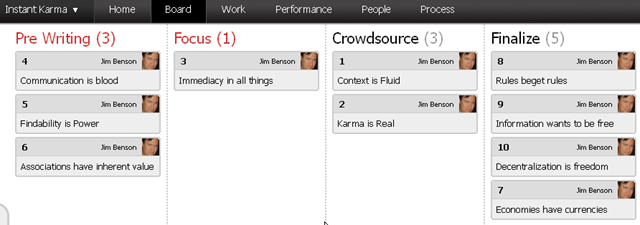
Kanban has two main states: a "station,” where value is created, and a “transition,” where the work item is moved from one station to the next. In the kanban below, we see the flow of work for my upcoming book, Instant Karma: 10 Principles of Social Media for Business. In the pre-writing phase, I am creating the initial text for a chapter. When that’s done, and my editor is ready to look at it, she pulls a completed section from my pre-writing section and places it in her “focus” state. There she and I edit and re-edit that chapter until we think it is ready to send off to the crowdsourcers. I was creating value in the pre-writing state, when that value was realized it then went on to the next state of focus, where it remains until that value is realized.
In the kanban above we see that what is moving is not tasks – but the actual chapter. In a work-flow kanban tasks are the mechanics that create value, not the value itself. The value is explicit in the work-flow. Thus, in a kanban, the work-flow is also called a value-stream.
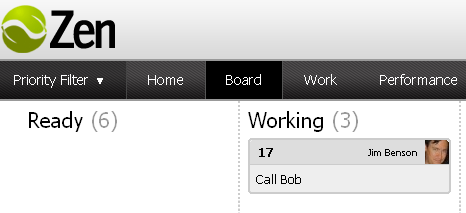
Here we have a task based kanban where I have the task of “Call Bob.” It’s going to run through my simplistic Backlog | Doing | Done kanban. But, let’s think about this a bit. Regardless of my feelings for Bob, does calling Bob ever give me actual value? No. "Call Bob" is merely a task, a mechanical action that should create value.
Later, if I am going over completed tasks and trying to figure out what makes me successful and what does not, “Call Bob” is a lousy artifact for judgment. There simply isn’t enough information there to let me make a decision.
So why not make the value explicit?
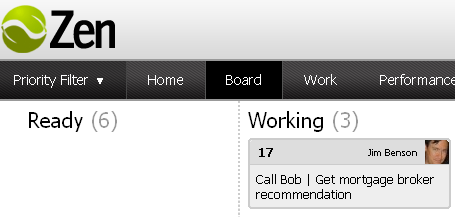
Here my reason for calling Bob is made more explicit.It could be anything you want from “talk about football” to “catch up.” Remember: Kanban isn’t making value judgments of your actions, it's simply reporting the value of what you accomplished. If you really like Bob, and want to call him just to shoot the breeze, that’s value to you. It’s fine. What you want is to discover tasks that don’t provide value and eliminate them, so you have more time to do what makes your life better.
Images created in Agile Zen, which I am loving.
Cards are Conversations
The whole point of having a visual control is to extract information from it quickly. In this respect, the personal kanban is much like a geographic map.Geographic maps convey more than merely the physical environment, they show us things like political, historic, organizational characteristics - both real and imagined spatial constraints - which give locations their context. Similarly, the personal kanban is a map of your work. It captures not just the tasks - but the logic, the flow that gives it an actionable framework
This is known as a pattern language.
11:26 AM
A language that helps us describe complex concepts simplisticly, by understanding their contexts.
11:27 AM
As we use the kanban to learn the pattern language of work, we have more kaizen events, more epiphanies, because we are finally understanding its true context. We learn what value really is, what our capabilities really are.
11:28 AM
threats disappear
This is known as a "pattern language," a language that helps us describe complex concepts simplistically, by understanding their contexts. As we use the personal kanban to discern the pattern language of our work, we encounter more kaizen events - more epiphanies - because we are finally understanding its true context. We learn what value really is, and what our capabilities really are. Soon, threats disappear.
Modus Cooperandi Personal Kanban
I have intentionally made this personal kanban screenshot illegible because the text does not matter. What matters are the visual cues - the colors, the assignments, and the states.In this kanban, we have three staging columns: a working column, "The Pen" (to hold tasks in a state of workus interruptus), and "Complete."Immediately we see that today our WIP is filled with teal tasks. Those happen to be for the creation of Gov 2.0 University, one of our projects. We’re getting ready to launch the web site and conduct some media events, so this particular day was spent focusing on those tasks.We also see that yellow tasks (biz dev with a specific channel partner) make up most of the work in a waiting state. So now we understand that on our plates for this day, we have a lot of focus on G2U, but that biz dev might rear its head as an activity from The Pen becomes active.So while those yellow tasks might interrupt us, the kanban has mentally prepared us for them.Those yellow tags likewise tell us a story over time. We know their history. Did they appear yesterday or did the come up over time? Are those tasks ones that recur and just never go away?Do we have a deluge of project tasks (e.g. teal) that need to be batched and processed as a day with a single focus? Perhaps we have a deluge of different projects, but all similar task types (e.g. phone calls) that can be batched.What personal kanban reminds us is to look beyond the tasks to the patterns that arise on the board. Work now has a shape. You can begin to think of it in other ways.You can situate it in its context. Work has a geography.With personal kanban you can now see the entire river – where it emanates from, where it reaches, and how it flows – rather than dismiss it simply as a body of water.In an upcoming post, the pattern language of work will be explored.
The Cumulative Flow Diagram - Metrics in Personal Kanban
This post discusses the most powerful - but perhaps most intimidating - technique. In upcoming posts we’ll look as some less intense methods, so don’t let this post scare you.In kanban for software design, a "cumulative flow diagram" is used to track performance. A big part of the cumulative flow diagram is its ability to visualize how close you are to completion of a large project, and where bottlenecks or waste appears in the process. It’s a very powerful and descriptive tool.Above is the cumulative flow diagram for the Modus Cooperandi Personal Kanban. The diagram illustrates how many tasks we have in a given part of our workflow. This is our workflow, so you don’t need to emulate it. The components are as follows:Backlog: Items that have yet to make it into the workflow.Priority 3: Items that are coming up in importance.Priority 2: Items that are important.Priority 1: Items that need to be done soon.Working: Items in the process of being done.The Pen: Items that are waiting for external input.Complete: Items we’ve done today.Archive: Items we’ve completed in the past.On this particular day, we completed 96 things in the past, accomplished 2 that day, sequestered 3 in the pen, and so forth. Of course, as time goes on, your archive is going to become bigger and bigger. In a directed project with a finite number of tasks, this is a very important part of the diagram. For personal kanban however, where tasks will build up forever, it shows us how much we’ve done or are capable of doing.Simply from a flow perspective though, we might want to eliminate that part of the diagram.So here, with no archive, we can discern some interesting patterns.First, we see where we complete some serious work. We also notice where we gain a lot more work. So on days where there is a tremendous dip in the number of tasks, in the above chart (but no dip in the first), we know that we moved a tremendous amount to the archive.We can also see where we build up backlog again. So, essentially what we have here are two graphs that show us (1) we are completing work and the number of tasks completed is continuing a fairly uniform rise, and (2) we see the actual variations in our work and when we take work on.Since the chart is a time slice taken daily at midnight, the parts of the kanban with a WIP limit should be uniform, and represented by fairly flat bands, with the only variation coming from “The Pen,” “working,” and “done.” If we have work in the backlog, we should be maintaining a fairly even amount of work in the queue. The diagram illustrates that we've been working to achieve this, and as we’ve worked more closely, the uniformity is starting to manifest itself.What we want to avoid is having the backlog band grow at an alarming rate. We want work there to feed the queue, but if it gets too overwhelming, we then know we have to start saying no to tasks.The time it takes to move a task from backlog to completion is called “lead time.” The time it takes to complete a task when you start working on it is called “cycle time.” “Work time" is how long tasks were on your board, and active. “Wait time” is how long a task sits idle in a queue, while waiting to be moved. In a personal kanban, you might move one or even dozens of tasks across your board in a single day, so for you these are the numbers to watch for variation.If at some point you notice your lead time jumps to 20 days, it’s obvious that you have too much backlog. If your cycle time jumps, something is stopping you from starting work. If your work time jumps, something is stopping you from completing work. If your wait time jumps, something might be stopping you from working at all.So...how do you measure this? At the end of each day, you can track the information in the cumulative flow diagram by counting the cards in each part of the work flow, and entering them into a spreadsheet. For the “times” you can write start and end dates on the cards, and calculate from there.Or you can use Agile Zen - which is where these images came from - and leave the tracking up to Nate.