" "

WIP and Priorization: Recommended Portions

Drinking from the Firehose cc. Chris Blakely

You've been hiking all morning and the mercury is nearing 100. You're parched. You need water - lots of it.  But even in your thirst, you want that water to be manageable.Which holds more water - a lake or a drinking glass?Which will satisfy your thirst - a fire hose or a drinking fountain?Whether it is water or work, limiting the portion size of something we are consuming actually makes it more useful. We do not lap from the pool or attempt to drink from the firehose's blast.In Lean, we limit work in progress (WIP) not just to slow people down and get them to focus, but to increase throughput. Standard procedure is to drink work from the proverbial firehose. All too often we try to do too much, too fast. And when we can't, and our productivity suffers, we feel we've failed.We have a throughput, our time is a finite resource. We are finite resources.When we limit our WIP, we acknowledge this.Pulling a task from our backlog into our WIP means that we are now using that very finite, very valuable resource. We want to make sure that the task we’ve chosen is of the highest importance.Of course “highest importance” is contextual. Some days it’s work for a given client, other days it’s specific tasks, and still others it’s work that fits in the small time slots you have to work.This isn’t just simple prioritizing of one thing over another. Your brain quickly picks up not only on your limited time but of the trade-offs that limited time generates.  You begin to conduct detailed risk assessments – naturally. I could do this large task for this client, or I could get these 10 little things off my plate – making me more able to focus tomorrow.  Or vice versa.Personal Kanban helps uncover what is really causing the most stress. Those little unfinished tasks, or that big glaring responsibility.  We’re all wired slightly but appreciably differently. Our flow charts similarly have their quirks.

Multiple Projects & Threaded WIP: Using The Big Picture for Personal Kanban

Work is messy

The two rules of Personal Kanban: Limit WIP and visualize your work.The truth about personal work: it’s messy.So people with messy work have been asking me for:

  • ways to create multiple Personal Kanban(s) with unique workflows,

    1. ways to manage the WIP of multiple projects in one kanban,

    2. ways to manage projects with different collaborators, and

    3. better ways to integrate a calendar.

To be sure, these are not easy requests to satisfy.For all of my projects, I have been using Agile Zen as my primary Personal Kanban tool. I have found it to be the best designed, easiest to use, and most powerful online tool available. It likewise gives me the statistics I need to help me understand the "way" that I work, which ultimately helps me to make better informed decisions.Unfortunately however, it doesn’t lend itself to the aforementioned demands, because those demands break some pretty fundamental laws of Lean.  Such demands ask us to:

  • abandon a central workflow (by integrating multiple workflows),

  • acknowledge a time-box constraint (by introducing a calendar), and

  • decouple WIP from a team and relegate it to the individual.

JimBenson_01 Nov. 13 20.13

So in an attempt to manage multiple projects, I've begun to use  The Big Picture. It isn’t perfect, but with its unique interface this free tool gets us a little closer to handling "the messy" than any other online tool I've come across.

Multiple Projects

JimBenson_03 Nov. 13 20.14

JimBenson_04 Nov. 13 20.15

JimBenson_05 Nov. 13 20.16

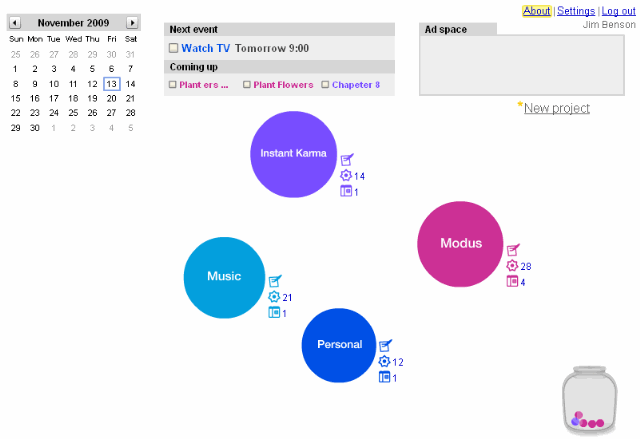
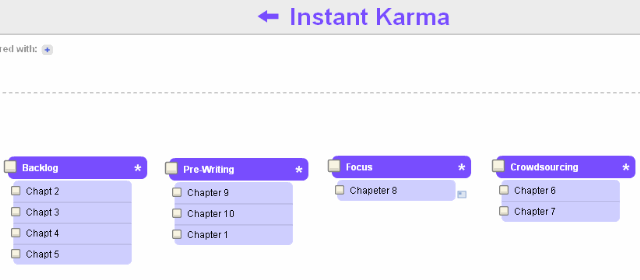
Pictured to the right is the main page from my Big Picture. We see that I have four simultaneous projects that are contributing to my WIP: Instant Karma, Modus, Music, and Personal.Each of these projects has its own workflow, set of collaborators, and type of demands. If we double click on one of the balls we get to see the kanban for that particular project.In this first example, we see that music can go from:idea --> in progress --> mix down --> review --> publicationTasks might also have subtasks or elements to be satisfied.  For example, the song “Presence of Mind” is in review and is awaiting feedback from John, Tonianne, and Chris.For the Instant Karma workflow, we see something very different -  a totally different workflow and totally different types of tasks.This system is inherently flexible.

Multiple WIP and Calendar Integration

JimBenson_06 Nov. 13 20.16

JimBenson_07 Nov. 13 20.21

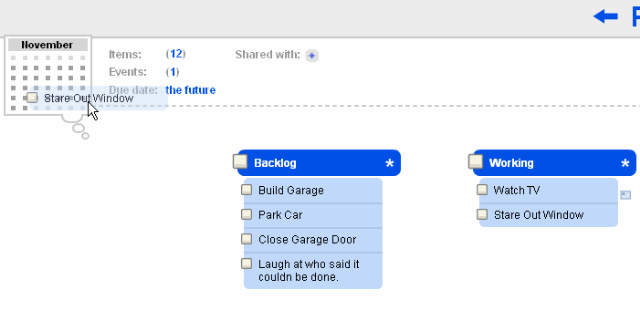
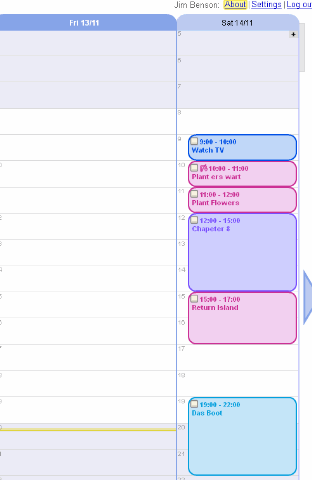
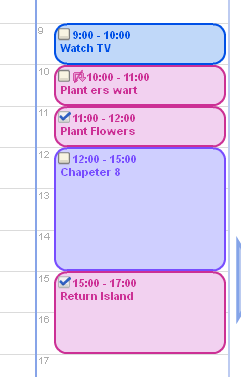
This system manages WIP by actually moving current WIP into the calendar.In the image to the right, I’m dragging a task from one of the task lists to the calendar in the upper right corner.  This brings up the calendar screen where you can begin to manage your day – your messy day filled with multiple tasks from multiple projects with different workflows and different teams.Color coordinated by the various projects, the day now is filled with tasks.  This is your WIP.  You can move it from day to day until it is complete. When it is complete, you simply check the tick box.You can rearrange them. The time really isn’t important but rather, it’s the activities during the day which are vital.  This is your shared WIP column.At the beginning of the next work day, you can revisit each of the projects, pull the appropriate tasks from one stage to the next, and then select the WIP for that day.

Multiple Users

The Big Picture allows you to share individual projects with other users. They can add tasks, complete them, and change the workflow.This means that people see only the tasks you want them to see, and can work tightly with their teams.

What This is Missing (Blessing and Curse)

This is missing performance metrics, detailed backlog tracking, user management, and firm definitions of what is a task, what is a project, and what is a point in your workflow.  The Big Picture offers almost no firm definitions, it simply allows you to create an arbitrary container and place things inside it.What this means is that it won’t give you some of the high-end features you want – but it also means that this simple system can help visualize some of the most complicated workflows.  Additionally, it means you need nearly zero time to set up your management system, and that you can be part of a plethora of projects and still manage them coherently with the other people participating.

What This Has

In addition to its flexibility, this system also has a completely unique interface. It’s both colorful and functional, making the user experience enjoyable. I believe this is an excellent launching pad for experimentation and innovation.Will it replace Agile Zen for me personally? No. I need the metrics, the serious database, and the superlative UI design that Agile Zen gives me.Can I see myself using The Big Picture for quick projects or projects with weird workflows, like recursive or multi-variant workflows?  Absolutely. The utter free-form of The Big Picture makes it too attractive an alternative when the bizarre raises its head.

Save the Date...for a Tweet-a-ban!

personalkanbanlogowithURLnov2009v1x150When: November 17, 2009Where: TwitterHashtag: #pkflowSave the date because Modus Cooperandi is hosting a "Tweet-a-ban." Whether you're a Personal Kanban practitioner or just have an interest in improving your  productivity, join in on the asynchronous, 24 hour long global conversation. For details click here.

InfoPak 2 - Personal Kanban 101: Achieving Focus & Clarity with Your First Personal Kanban

JimBenson_01 Nov. 05 11.44

Personal Kanban 101

View more presentations from

Jim Benson

.

Modus Cooperandi is pleased to announce the release of its second Personal Kanban InfoPak. InPersonal Kanban 101: Achieving Focus & Clarity with Your First Personal Kanban we discuss the essentials for getting your board started. Topics addressed include how to establish value stream, backlog and WIP, and why there are only two hard rules to implementing this productivity tool.As always, please feel free to download, distribute, comment and let us know what you think.

" "