" "

When Good Tasks Go Bad

IBM Mainframe

Yesterday we were introduced to Richard, who is juggling the demands of several clients trying to keep each of them happy. His largest project entails working alone on a client's mission-critical legacy system. So in the last blog post we discussed his tasks and task types. As we discovered, outlining those task types proved invaluable to him when needing to communicate how he was working to meet his client's requests.In addition to needing to distinguish task types, Richard explained one of his biggest problems he faces is getting mired down in tasks where the solution was difficult to find. (Remember, the system he's working on is undocumented, complex and the work of several coders - so interpreting what he's reading is kind of like solving the DaVinci code every day.)Interesting work perhaps, but it can eat into your personal life when tasks routinely cause you to work late.When I asked him out of 20 tasks, how many are likely to go afield, he responded with a tentative "15."Holy moly - FIFTEEN!Needless to say, 75% of something impacts process. You can plan for 75%. 75% is not an error, it is status quo.Then I asked, "Does your client understand the miracles you are working?""Not really," was his reply.When the client doesn't understand status quo, that's also a problem.So I explained how we needed to make these issues explicit for two reasons:1. To Stop Richard from Becoming Mired Down We want to give Richard the ability to note a task as blocked, to identify the type of blockage, and to explore some options for action. (Note: the task may be blocked, right now that's miring Richard down. We want to give him permission to move around.)2. To Communicate Status on Specific Tasks We want the client know at all times, what's going on.First, we examine what the major blockage types are:

  • Interaction Blockages - These tasks have begun and require help from an outside party, and

  • Slogs - Tasks Richard has to slog through, alone.

So, just as we did with the task types in the previous post, a useful way to visualize these blockages is also with color.Task types were specific to, and travel with, the tasks. If these types of blockages are rare, then they would also be task-specific. But at 75% they are actually part of the workflow. They are likely events in Richard's regular working.His workflow would go from this:To this:Richard allows himself an overall WIP limit of 2. But "Stucks" get so stuck that the only way he can move forward is to do other work until something happens that will unstuck a stuck. (release a stuck?) This results in exceeding his WIP limit because incomplete tasks wind up littering his value stream.The new "stuck" columns are WIP-exempt and allow Richard to put active tasks in Coding, Testing, etc. while the stuck tasks are allowed - at least momentarily - to languish in the stuck areas.Admittedly, this is totally not a preferred way of working. If Richard were anything other than a lone actor, I would do everything in my power not to suggest this. I would be looking for ways to bring teamwork to bare to solve these stuck tasks. But historically Richard has had no team to rely on, and it serves little purpose to have him try to force solutions when they are slow to come by design.Again, with a full 3/4 of Richard's tasks being put into a holding state due to complexity or the need for additional input, that activity needs to be visualized before it can be dealt with. We need to see the procedural breakdown to refine our understanding of it and then, and only then, can we hopefully deal with it.Perhaps 70% of these stuck tasks deal with a few, identifiable areas of the system. Richard could then add up the time he's spent working with those specific areas and approach his client with a suggestion that he actually re-write those areas from scratch. As Richard did so, he could document his code and adhere to a coding standard that was higher than the one the original authors adhered to. This in turn would make the code more maintainable and, in the end, remove 70% of future blockages, saving his client money and Richard future heartache.I can't stress this point enough - the goal here is to visualize what is really happening, and then do something about it. Without the assistance of visualization in this and the previous post, neither Richard nor his client could gain clarity into the complexity of Richard's work load. Now that both he and his client have work types and are visualizing the tasks that are mired down, they can at long last make decisions that free Richard from long work hours and difficulties in estimation.Now Richard can better schedule his work time and attempt to achieve the coveted albeit elusive work / life balance. Not surprisingly, tomorrow's post will address this very topic.Photo by Steve Jurvetson

What Are Your Task Types?

Mrs Winchester's WIP

Flexibility is an unsung virtue. People want absolutes: "Do this, then do that, don't deviate and then you'll achieve success." But we all know that absolutes are often false, and that context is king - in life, in work, and in all human endeavor.So limiting our WIP needs to take context into account, even WIP limiting needs to be flexible. Sometimes tasks just don't behave themselves. Some are extremely urgent, while others become mired down for whatever reason. Both of these scenarios demand respect.I recently had a session with a personal coaching client who has just begun using Personal Kanban. He had set up a few rather detailed value streams, but was having trouble limiting his WIP because different task types were causing conflicts.At Seattle Lean Coffee, the topic of task types has come up at almost every meeting.It's clear we need to talk about task types here.So, let's examine the case of a coder, whom we'll call Richard.A hired gun, with a busy home and work life, Richard is juggling multiple commitments. His primary client is a company that uses an esoteric software system to run their business. Not only is Richard one of only a few (less than 5) individuals on earth familiar with this particular package, the others are not interested in working with it any more.Over the course of each month, Richard receives tasks from his client. These tasks come with some - but not rigorous - prioritization. Every so often though, a bug will surface that impacts the company's operations, and Richard will need to drop what he's doing and focus instead on that bug.Over the years, the system Richard is "lucky" enough to be stewarding has been touched by a succession of coders resulting in a tangled mass of spaghetti code that is undocumented, and often difficult to read.Think of it as the Winchester Mystery House of source code.All too often, problems often arise requiring additional work just to locate the issue, not to mention having to test and find the impacts of any changes he might make.From his experience, Richard has identified five main task types:

  • Easy tasks - these are straightforward, can be done quickly, and will require minimal testing;

  • Normal tasks - these can be done in a few days without much, if any, outside interaction;

  • Hard tasks - these are tasks that will require a lot (or at least an unknown amount) of work and research;

  • Escalated tasks - these are tasks that cause the client discomfort and need to move to the front of the queue; and

  • Emergency tasks - these are tasks that displace the work already in process and become in-process.

For Richard who is working solo and off-site, parsing his tasks out like this is invaluable. Since his client has had little visibility into his workload, he's begun using an online Personal Kanban tool to create a workflow that he can share with his client. Tasks are colored according to their type, allowing the client transparency into the mix of work he has.Right now, the client has no way of knowing the grades of severity of tasks. Tasks that sound simple to the client can sometimes be difficult in the code. Similarly, tasks sound hard may actually be very straightforward. When the client is waiting for results, it's important for them to know which tasks look easy or hard. This will directly inform the client's risk assessment of setting Richard loose on a particular task. If he identifies one as hard, the client can then re-assess the priority of the task and the investment it might require.With client access to Richard's Personal Kanban, and task types clearly differentiated, clients can work alongside Richard to prioritize and schedule specific tasks. This will increase mutual understanding by giving them something visual and tangible to speak to when they have their regular meetings. Work can always be re-prioritized on-the-fly by mutual agreement. With transparency into Richard's workflow, the client will be less inclined to feel behind schedule because level of difficulty is now understood.Richard can now use all this information to help guide what items to pull when he's moving from one task to the next. Escalated and Emergency tasks are self-evident and should be rare (if they aren't rare, that points to other problems we'll talk about in a later blog post). Beyond those, Richard's risk assessment for pulling specific tasks is based on an amalgam of client priorities and available time.If he looks into his backlog and, if he has only a few hours, he can pull out an Easy task. If he has a few days, he can pull a normal task, etc. His risk profile for pulling tasks is now informed by these task types.And yes, this is all fine until some task goes wrong. Which of course will happen. This we'll cover tomorrow in the post "When Tasks Don't Go Right."Photo by Jeffc5000

Inventory Makes Work

Inventory Makes Work

Lean talks a lot about inventory. A major tenet of Lean is to reduce inventory. Companies that stock up on too much stuff have to maintain that stuff, manage it, and then deal with it when it is no longer useful. This is why companies end up having huge sales at the end of the year - they've amassed warehouses of stock (or their suppliers have) and now that merchandise needs to be sold fast.

Inventory lowers organizational effectiveness because the time and money spent taking care of the inventory could have been spent making the company more successful. Therefore, Lean organizations tend to receive the things they need to operate at the last responsible moment, this is called "Just in Time" (JIT). A JIT organization does not take on inventory until the moment they need it and therefore spends as little as possible maintaining inventory, greatly reducing the risk of having overstock.But inventory isn't just "stuff." Inventory for us as individuals includes anything we have that requires maintenance or on-going attention. We have responsibilities, they aren't going away. We will have a yard, it will need to be mowed. Dishes need to be washed. Children need to be raised.Other inventory comes in the form of stress. Stress, I would argue, is inventory. Your brain is like a factory, you take in information, you create value. Stress slows your factory down.I've written about "Existential Overhead." Stress is a big part of that overhead and it is totally inventory. The question is, how much of our stress do we manufacture ourselves? Certainly there is stress that comes from outside our control. Illness in the family, natural disasters, economic crises - we can't do much to stave these off.There's other overhead we create for ourselves. Lean teaches us to save action until the last responsible minute, but procrastination teaches us to ignore action until someone yells at us. Procrastination is not responsible. The more you procrastinate, the more you know someone is going to yell at you. So, even when you are doing something else, you are fretting about what you aren't doing and that lowers your productivity.Focus for you as an individual comes from an understanding of what you are doing and why. Existential Overhead, inventory, stress all combine to make you question what you are doing and why. That muddies your understanding, you lose focus, and your effectiveness decreases.The biggest problem here: if you stress about things that can be relieved, when big problems come along, your capacity to absorb that extra stress is reduced. And if the new big problem is too big, you lose your cookies. But all we needed to do to keep our cool and rise to the occasion was some work up-front to relieve those previous stressers.I invite you to look at what is going on in your life, identify stressers and other inventory that you 

know

routinely keep you awake at night, and start to figure out ways to mitigate them or even remove them from your life. Especially look for stress you are manufacturing yourself.

Guest Post: My Current Personal Kanban System

sbp9Or5wBCj7TxXL09Dx2HQ

One of my favorite observations about using kanban-like systems for time management is that I have never drawn the same task board twice. Every system that I have designed has had some unique feature to it. Even if I start out with something generic, it will quickly evolve into something that reflects the unique circumstances in which it is applied.A key parameter of the design of a visual control system is the number of participants in the system. The purpose of visual control is to maximize human understanding of the current situation. The contents of that maximum depend on the number and complexity of the parts involved. A system that tracks 100 people will look a lot different than a system that tracks 5 people.A special and interesting category of visual control system is one built for the individual. I have developed and applied a number of different visual task management systems for myself and for other individuals.  I'd like to describe the simple and practical system I am using at present and how I arrived at it.

Some history

My early attempts at using a kanban-like system for managing personal work looked a lot like other contemporary kanban schemes for workflow management. That shouldn't be surprising, since most people learn about the kanban idea from workflow or supply chain management, and so did I. I used a scaled-down version of the kind of ticket-based scheduling board that is sometimes used for office work.

I intended to use the board to track all of the work that I had to do, rather than work of one particular type or for one particular project. This meant that I had to limit any workflow to its least common denominator of ready->busy->done. Coordinating workflow is most of the power and purpose of a conventional kanban system, so reducing workflow to a triviality leads one to wonder what benefits might remain and how best to represent those benefits.While kanban is mostly about workflow, a ticket-based system also encourages you to think of tickets in any planning stages as options, whose value depends upon the time that they are exercised. You can probably think of many more tasks that you might like to do than you can ever hope to complete, and using tickets to represent all the options can help you to realize the set of tasks that best represent your priorities as circumstances evolve. The population of surplus tickets that never get promoted to action can be controlled by giving every ticket a lifespan.Optional tickets fit nicely with the autonomous, self-directed nature of personal work.  Discovery, opportunity, and potential are as much a part of the personal experience as achievement. In a personal kanban system you are the consumer as well as the producer. You are not a slave to your own backlog.Even if we don't care about workflow, adaptive planning is a capability we'd like to preserve.

Necessity is a mother...

I suspect that I will always favor ticket-based systems for teamwork, but I found it to be too contrived and too much overhead for personal work, so I quit using it after a while.  I limped along with old-fashioned calendars and to-do lists for some time, but unsurprisingly, the same problems that led me to try kanban in the first place eventually resurfaced.Without the visual control, my attention slowly divided between too many complex interests to keep track of without resorting to oppressive calendar scheduling. I thought of many valuable goals to pursue, each one realistic on its own, but improbable in the practice of competing for attention with other interests. Frustration eventually led me to reconsider the problem.Like most problems of analysis, it is important to distinguish the universal from the particular.  The universals of work stem from human nature, and everything that does not speak to human nature must be situational.Such universals might include:

  • Productivity is a measure of work that you finish, not work that you start.

  • The human mind can only focus on one conscious task at any moment.  Humans can only achieve the appearance of multitasking by time slicing, which makes every task take longer to complete, and increases the risk of poor quality or incomplete work.

  • Visualizing all of the work to be done makes it much easier to control that work.

Other facts about work are situational:

  • scope of work is individual vs group

  • finite tasks vs continuing processes

  • homogeneous vs heterogeneous task types

  • periodic vs reactive tasks

A personal task management system is, by definition, concerned with an individual scope of work, so schemes designed for teamwork may not be ideal for this purpose.  In particular, ticket-based systems like the traditional kanban are excessive for personal work because the function of the kanban ticket is as a signaling device and a medium of exchange between members of a group. You don't need such a contrivance to communicate with yourself.It is the other feature of a kanban system, the limitation of work in process, that we wish to capture for personal work management.

Metaphor and geometry

A person is not a task factory. Most of my time is not directed towards responding to external demands. Much of the time I spend is in the service of some ongoing ambient process that will never be satisfied: eating, sleeping, paying taxes. Other areas of concern are goal-oriented and spawn specific sub-goals and tasks in response to evolving circumstances.As a human, my life is ultimately governed by the limits of biological necessity. Dividing up the 24-hour day is a zero-sum game. Time spent sleeping comes at the expense of something else. The periodicity of time is the fundamental fact about personal time management.On any one day, I may make circumstantial decisions about how I allocate my attention, but over time, these allocations average out to reflect broad priorities. A general-purpose personal system should be oriented towards balancing attention between areas of concern which are open-ended processes.

sRupSNH_1txCpSR3868A_Ag

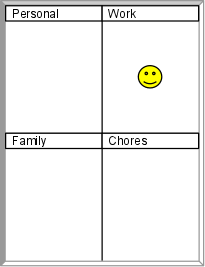
The natural visual representation of such a problem is geometric: the partition of a finite area. A limit to work in process is implicit in using a finite area to account for work. The partitions of that area allocate limits to the individual concerns. A whiteboard, once again, becomes an expedient tool to represent such a scheme. Each partition of the board represents an ongoing process or long-term goal.  We only need to track processes that require planning, so we can leave overhead processes like sleep off of the board.  Work may or may not require tracking, depending on the kind of work you do.

sz8a9yPxl3NIXGCkFrbh1Cg

We could use a token to represent which area has our attention at any moment, but there is only one "token of attention". If you're doing chores, that means you can't be sleeping. We should try to define our areas of interest in a way that makes them independent of one another.Dividing up the major areas of interest in your life makes for an illuminating exercise and a step towards gaining control of your time, but that isn't enough to make an effective time management system. The time spent in service of an interest will usually be applied towards specific goals and tasks. Since we have already accounted for the continuity of our interests and the periodicity of the 24-hour day, we can now revert to hierarchical lists to track individual tasks.

shHRWgUe4wyIGApfgd3YrVg

Once again, we can apply geometry to our ends by limiting the physical space available to contain a backlog of tasks. Topic boxes should be proportional to their importance, and not to the number of tasks expected. If you run out of space to add a new task, then you have to delete one or coalesce tasks into a higher goal in order to make room. Always adding tasks to the bottom of the list, in a "ring-buffer" scheme, helps you keep track of which tasks are oldest and stalest. While the ring-buffer scheme might seem like a limitation, it actually fits nicely with our option-thinking view of the world. If a task sits around for long enough to be lapped before being selected, then it can't be that important and deserves to be deleted.The scheme so far helps us decide the relative importance of tasks and whether they are worthy of our attention. It does not, however, give us enough information to decide which task to work on next. We can address that by adding the notion of a "current task token" within each area of interest. The current task token indicates the item we are currently working on, the item that we were working on before we switched areas of concern, or the item that we should start next when our attention returns to an interest. A dot-style magnet serves this purpose perfectly, which is one of the many reasons to use a magnetic whiteboard for time management.

svD9lKB7TFni-h7X77yqnYw

For the computer-minded, this scheme is starting to look suspiciously like the scheduling of operating system processes. But we only aim to provide a data structure, the algorithm that animates it remains a heuristic in your mind.The current task token indicates the context of the present, but we might also have information about the future. After we complete a current task, when do we decide which task to start next?  We could wait to make that decision until it is necessary, but it is also easy to keep track of our current expectations. We can add new tokens to indicate what we should do next as well as what we are doing now.

s4TpGwFwn_RDec47JFwnJSA

Prioritized tokens come in handy for another reason. Personal tasks are likely to be interrupted and blocked, even while their parent processes are still active. Maintaining a small hierarchy of priority tasks makes it easier to adapt to fits and starts by accounting for thread switching within the current process.

Conclusion

In the end, I came up with a system that was so simple that it almost seems trivial. And that's exactly why I like it. It directly attacks the weaknesses of the unstructured to-do list with a minimum of cognitive overhead. It addresses universal principles of work in a way that is tailored to personal scope. The maintenance of the system is extremely easy. Both active work and planned work are strictly limited. It is constructed from inexpensive common materials. And most importantly, I am finding it much easier to live with than any ticket- or folder-based system.

" "