
In November, 2010, Jim Benson spoke at the Oredev conference in Malmo, Sweden on Energizing the Individual Coder and the Psychology of Kanban.Clarity Means Completion: The Psychology of Kanban - Jim Benson from Øredev on Vimeo..
How We Interact with Kanban (Video)
In November, 2010, Jim Benson spoke at the Oredev conference in Malmo, Sweden on Energizing the Individual Coder and the Psychology of Kanban.Personal Kanban: Optimizing the Individual Coder - Jim Benson from Øredev on Vimeo.
Kanban for Short Intense Projects: How We Used Kanban to Visualize Our Hiring Process Workflow and Make Our Lives Easier
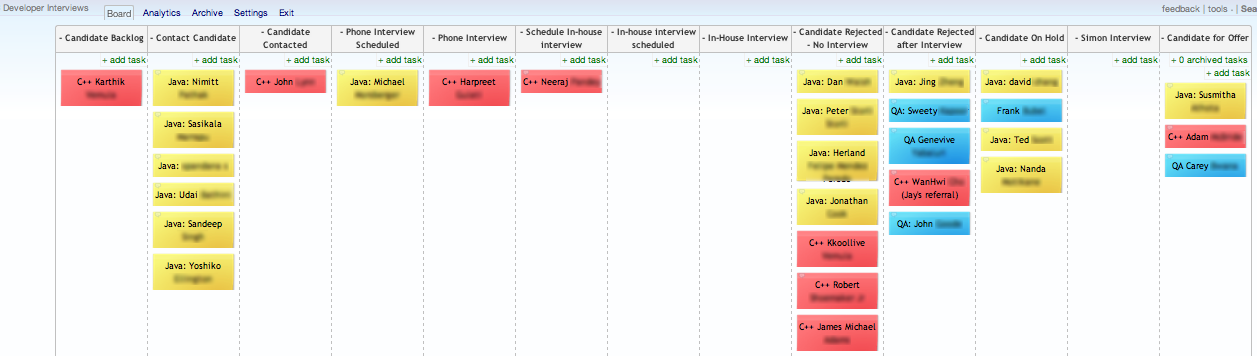
This is how we used Kanban techniques to visualize our hiring workflow, empower hiring process participants, and give executives a bird's eye view on a short term project.For many companies, hiring is something that happens in spurts rather than every day, week, or even month. At this very moment, many firms may be going through a hiring process, significantly staffing up as the recession appears to ease. If you are involved in this effort and are like me, you are probably banging your head against your desk as you try to keep track of all the job candidates and what phase of the hiring process they are in, while simultaneously trying to attend to your regular job.In smaller businesses that have limited to no HR resources, this process can be a daunting endeavor. To hire for just 6 to 10 developer positions, there are often hundreds, if not more, applicants to sort through, review resumes, conduct phone and in-house interviews with, and offer jobs. Frequently, company participants have forgotten the steps and effort involved from the last time this process was enacted and therefore feel foolish as they stumble through it again. Executives and participants generally have little insight into what is going on and end up constantly emailing back and forth to check on the progress of the effort, to find out who was rejected and why, or to find out who has made it through and requires a formal offer. Interviewers must always report results back to a single point of contact (or more likely a single point of failure) who is tasked with keeping track of every candidate's application "state." Finally, anyone other than the single point of contact is usually clueless when a potential candidate calls in to check on the status of their application. After going through a full on hiring process, most people, other than seasoned HR professionals, are loathe to attempt it again.To combat the organizational nightmare that is inherent in intensive short term one-off projects, a group at our company took a stab at visualizing our hiring process workflow on a Kanban board. Our CTO made the suggestion, as our company is currently in the process of making a heavy transition to Kanban (facilitated by Jim Benson's amazing consultancy) and we all have "Kanban on the brain." My first reaction to this suggestion was, "haha, thats a good one" but after a moment of contemplation, I realized this was truly a great idea. Our team used Kanban Tool (kanbantool.com), as we have multiple remote users, but this could just as easily be done on a traditional white board, with Agile Zen, or even Google Draw.I worked with our office manager Judy, the CTO Jabe, and the developers responsible for interviewing candidates to come up with a Kanban board reflecting our ideal hiring workflow, accompanied by a document laying out roles and responsibilities associated with each column on the board. We held a 30 minute kickoff meeting to describe the process to all involved and get feedback and then we were off the races. Our company has a good amount of experience with "Agile" after working within Scrum parameters for the last 3 years so everyone understood that the Kanban board and hiring process might start off imperfectly but the goal would be to adapt and improve along the way.This is the document which was shared with all hiring process participants, containing roles and responsibilities:Interview Process DocumentHere is a screen grab of our Kanban board (click to see full size):
Kanban for Hiring
If you read the Roles and responsibility document I linked to, you'll understand the hiring process we proposed and some of the changes and suggestions for improvement that happened along the way. However, even if you didn't read the document, the beauty of using a Kanban board is its self explanatory nature. This was especially apparent when few participants had questions during the kickoff meeting. In my experience, even the best laid plans are often confusing and require multiple explanations when presented in a list or outline format. Outlines and text just aren't the most effective way for people to process or remember initiatives requiring multiple pieces to be pulled through multiple phases. Kanban made this easy.When we created the board, we used color coding for the type of job the candidate was applying for and we implemented the following columns:
Candidate Backlog (candidates who submitted resumes)
Contact Candidate (candidate placed here when it was determined he/she was qualified from resume)
Candidate Contacted (candidates who had been contacted)
Phone Interview Scheduled (candidates who had a phone interview scheduled with a developer)
Phone Interview (phone interview in progress between candidate and developer)
Schedule in-house interview (candidates who passed phone interview phase and should be scheduled for in-house interview and test)
In-House Interview scheduled (candidates who had in-house interview scheduled with product owner and developers)
In-House Interview (in house interview and code test in progress between candidate, po's and developers)
Candidate Rejected (candidates who were rejected after phone or in-house interview *this column was later changed)
Simon Interview (candidates who passed all interviews and would be called by COO for final discussion)
Candidate for Offer (candidates who were receiving formal offer letter).
Candidate Info
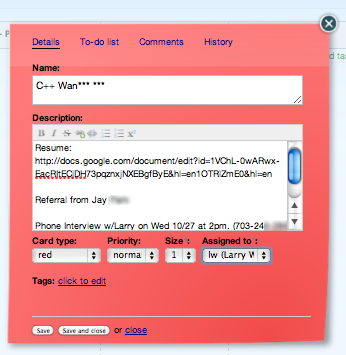
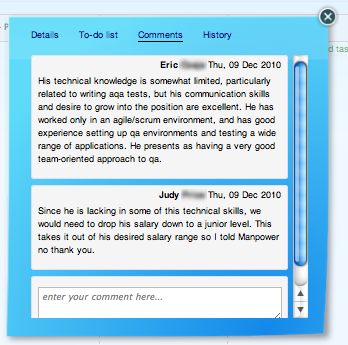
After some experience with the process, participants asked us to add the job type in actual text to each card (the color coding was considered a bit too confusing on its own). We also split the "Candidate Rejected" column into "Candidate Rejected - No Interview" and "Candidate Rejected - After Interview" and added a column for "Candidate On Hold."The nice thing about using something like Kanban Tool is the ability to add candidate information, such as a link to each candidates resume in Google Docs, to each Kanban card. This information is readily accessible when a card is clicked. This makes it easy for interviewers to find documents and information associated with each candidate in a timely and efficient manner.There is also an area for interviewer comments so executives and anyone else can effortlessly check in on why a candidate was rejected or passed on to the next stage:
Card Comments
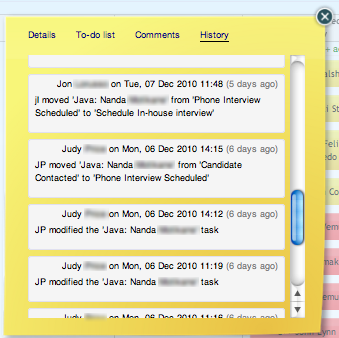
Card History
Finally, Kanban Tool records each step along the way, allowing us to know exactly who made which decision, in case we ever need to trackback (although this feature, along with comments, is just a perk of the tool we used - not something completely necessary to visualize the workflow).Using Kanban to visualize this intense short term effort resulted in many positives compared to using traditional project management approaches. Here are some of the things we saw:
Rather than relying on single point of contact for all information, participants and interested observers could get just about everything they needed from the board.
Participants were empowered to make the hiring decisions themselves because they readily understood and could act on the goal. The Kanban board visually facilitates this type of understanding.
Executives, who often worry about efforts which are extremely important to the company, were able to see the plan was being followed, the rate at which the process was progressing, and the status of each candidate at a glance. This meant less questions from above, and therefore smoother day to day operations.
There was little confusion concerning the process at kickoff because of the visual nature of Kanban.
Participants felt free to make change suggestions to improve the process on the fly. Those changes could be made and disseminated quickly. This is crucial to a short term project where oftentimes if change can't be made extremely fast, it's not worth making.
We now have an easily accessible and quick to read "living" document of how this process should work for future reference.
For some reason, this process just felt much more effortless than times in the past when I've gone through something like this. I believe this is because, by empowering all participants, a "team" mentality was fostered which led to cooperation and a culture of improvement centered around a short term process (unheard of!). This was good for everyone involved and good for the company.
One thing to note: Seasoned Kanban practitioners might wonder how we dealt with WIP. We did discuss WIP limits in the beginning but as this was for a hiring process and not development, we decided not to set any and to see what happened. The WIP for this process seemed to work itself out and stay low as each phone interviewer could only obviously handle one phone interview at a time, and each in-house interview group could also only interview one candidate at a time. It may also have been the superb scheduling abilities of our office manager but it never became an issue and there were very few bottlenecks, the worst being "phone tag" moments. This is not to say we would not have immediately imposed WIP limits if flow or end results were poor.Finally, a word of warning: As with anything, someone still needs to "own" the process, watch the board, and make sure the gears keep turning. Our office manager Judy assumed this role. She made sure busy developers had the interviews scheduled on their calendar and if a responsible party let candidates stack up or sit too long in a column Judy would make sure to poke at them until they took action.So that, in a nutshell, is how we used Kanban to keep ourselves sane and productive during a massive (for us) hiring effort with no HR staff. It would be interesting to see comments on how our process could be improved!
The Iron Chef Paradox

You have one hour. Just sixty minutes to prepare a meal for four, five courses of the highest possible quality, and with conspicuous creativity. The key ingredient comprising the meal is kept a secret until the last possible minute. While you’re used to working in a kitchen you control, surrounded by people who are trained to ensure your success, you and your team are preparing this meal in an unfamiliar location. Relatively speaking you are a novice, while the individual you are competing against is a celebrity chef of international renown for whom this type of challenge is second nature. And if these conditions aren’t stressful enough, once your meal is complete, every chef on earth will know what you’ve created, how you’ve created it, and what the judges thought. Oh, as will millions of viewers worldwide.Your reputation hangs in the balance. Failure is not an option.
How can a chef create five dishes all at the same time with this much existential overhead? Is five not a WIP-busting number?It’s the Iron Chef Paradox.
In the book
, Malcom Gladwell invokes the “10,000 hour rule,” based upon the research of sociologist Anders Ericcson that suggests if you do something for 10,000 hours you become an expert. But what does it mean to be an expert?Our brains are pattern recognition devices. The more we practice something, the more we’re able to process its intricacies efficiently and effectively. Whether it’s golf, cooking, or even empathy, practice creates proficiency.So-called “Iron Chefs” do not see five dishes in progress. They do not see a WIP-busting workload. They see one meal for one group. The meal for them is a pattern.They can see patterns foremost in the food itself. Chefs know what the current level of completeness is by sight. The food - for them - is a visual control. Simply looking at a fillet of sea bass on a grill from across the kitchen is sufficient. As it transforms from translucent to milky-white, the chef knows how close it is to done. This is known as prototype matching. As we work through those 10,000 hours, we build up a library of pattern prototypes to recognize.Understanding prototypes allows Iron Chefs to effectively prioritize under extreme duress. You put your rack of lamb on long before you plate your ice cream. Without understanding both the time and sequence of the patterns, effective prioritization is highly unlikely.Patterns are all around us, we just need to sensitize ourselves to them. We need to be aware of what we are practicing and do it purposefully. With Personal Kanban, we have a visual control and can actually practice living. In the past, we just worked. Even though we‘ve all had a lifetime of starting and (sometimes) completing tasks, we’re often oblivious to the patterns and unaware of the prototypes of our work. Without recognizing these, without understanding how our choices impact our future, our WIP limits have been strained sending our stress levels through the roof.Chefs like Bobby Flay understand the patterns and prototypes of cooking so well, they can create dessert out of tuna.What can we accomplish on a Saturday with a mixed backlog? What can we create with our colleagues at the office in a week? What patterns are there to help us recognize pitfalls and find success?
(
)
Would You, Could You on a Plane?

As a matter of fact, yes.I boarded the first leg of my flight from Seattle to Hanoi. I had 19 hours of flying ahead of me. I also had a backlog, and no wifi. Agile Zen was not going to be useful for me. So, I opened Open Office Writer and made a quick table.I had a series of things to do, but with a few constraints. The first was that I was likely to fall asleep at some point, so I wanted to knock out the most important task first. The second was that I had a list of commitments I'd made over the week and needed to make good on them. Fortunately, I have a 17 hour battery and a 4 hour battery as backup, so I had enough juice to cover me.In no particular order I wrote down my work. I had 14 papers to read for Hanoi, so I began with those. I knew that not finishing them first would mean I'd read them when I was too tired to retain anything. Then I went to work on the feature sets for the new software projects. Finally I ended with blog posts (of which this is one).In the end, I had a full accounting of what I'd done - so I could make sure that the files and work completed in-flight made it to the appropriate people and after-action steps were taken.I want to point out again, you don't need special hardware or software, you just need to visualize your work, limit your WIP, and prioritize.