" "

Kaizen Camp: Seattle 2012

lean camp 2011

harold speaking

Following last year’s excellent “Seattle Lean Camp,” we are now nearing Kaizen Camp:  Seattle 2012. (We did have a name change, so as not to confuse us with another set of camps with the same name.)Kaizen Camp is July 24-25, again at the beautiful Center for Urban Horticulture. Yet again, we have award-winning food trucks catering the event (both with vegetarian options), so no boring food! Already the event is nearly half full, with attendees from software, government, health care, manufacturing, education, and more.The diversity of voices and ideas is unparalleled – which is exactly what we were aiming for. Lean ideals and principles will be discussed. People sharing their success stories as well as their challenges. Different disciplines working together to create new ideas and explore continuous improvement.Last year we were blessed with great conversation, learning, food, and near gender parity. Judging by the buzz so far, this year promises to be even better.What to expect:

  1. Great sessions

  2. Conversations with other smart people

  3. Learning about what is working

  4. Strategizing about sticky problems

  5. Exploring ways to create better working environments, systems, processes, and policies

What you will be spared:

  1. Dull speakers

  2. Bad boxed lunches

  3. Canned presentations

  4. Being silent while others talk at you

  5. Sales pitches from consultants pretending to be speakers

Cost and SponsorsKaizen Camp: Seattle is $79 early bird and $99 late bird. With all this learning, two awesome meals, a full day of snacks, and a T-shirt from Nordstrom, that’s a steal. We couldn’t do this without our sponsors:

  • Nordstrom Innovation Labs

  • Modus Cooperandi

  • University of Washington

  • University of Washington – Bothell

  • LeanKit Kanban

See you there!

Just Close It!

tabs

Recently I noticed that I have a bad habit.I will go through a Pomodoro which includes a lot of research or interacting with multiple web tools. These all end up becoming tabs in Chrome. After three or four Pomodori, I can’t find anything because I have too many tabs open. This causes frustration and creates multi-tasking situations, even when I’m focusing.The tabs actual create visual clutter despite my attempts to find clarity.So, today I instituted a rule … when I’m done with a tab – I close it.That’s it. It’s pretty much that simple.

Rules, Motivation, & Systems Thinking: Lean Muppets Post 10

It’s a horse! It’s a cow! It’s a cotton ball!

Okay, we’ve reached the 10th episode of Lean Muppets, and the last one, I’m sorry to say. Over the last six weeks, I’ve had great conversations that started with, “You know where Fozzie ….” and ended with deep thoughts about lean. I’m taking that as a sign of success.So in this final installment we find Kermit as a middle manager. He has empowered his staff to provide value by employing an elegant system.His system is “get employee to guess what is in a box and reward them by getting what is in the box.”The payoff of receiving the thing in the box is a fiscal payoff. We call this an extrinsic reward – or a reward that has an external value to the recipient. For example, if I pay you a salary, that is an extrinsic reward. You will value it, perhaps even need it, but it’s value is a market value. If I pay you $90,000 a year to work at an awesome job, you might consider it. If I paid you, $500 a year, you would likely slap me – regardless of how awesome the job is.This is opposed to an intrinsic motivator. This type of motivation appeals to what is inside of us – what we love. I don’t have to pay you to go see a movie with me. Nor should I have to pay you to read a book. You do these things because you like movies or you want to learn. These intrinsic motivators can outweigh or exacerbate discrepancies in external motivators. So, if you could make $110,000 a year in a crappy job or $90,000 in an awesome one … the better lifestyle and less stress might make $90,000 more attractive.In this video, Kermit has set up a system with an extrinsic reward and no intrinsic rewards at all. Kermit feels that the reward of what is in the box is enough to buy his employees’ time. Unfortunately for him, his employee quickly surmises that the contents of the box doesn’t match with the currency he trades in. Cookie Monster solely deals in cookies.The moment Cookie Monster states that he doesn’t want to participate, Kermit exercises positional power and lays down some rules.Rule 1: You Must Guess What is in the BoxAt first Cookie Monster negotiates. The rule now places them in an adversarial role. Kermit is laying down the law, Cookie Monster responds with “Reactance.”  Cookie Monster says, “I don’t like being told what to do, you’re going to have to sweeten the pot. Given that I only trade in Cookies, I demand you give me a Cookie.”Getting the system to work is very important to Kermit, so he gives in and says if Cookie Monster guesses what’s in the box, he will give him a cookie.Rule 2: You Must Guess Using CluesCookie Monster still doesn’t care one lick about Kermit’s system, he just wants a Cookie. So he starts guessing what is in the box. “A horse! A cow! A pogo stick! A Cotton Ball!”But that’s not good enough for President K. the Frog, he now tells Cookie Monster that he needs to logically guess with clues.Kermit gives him two clues that sound like a Cookie – You can eat it and it is round. So Cookie Monster draws on his vast expertise in cookie systems and comes to the logical conclusion that it is a cookie. That’s Cookie Monster’s world view – that’s where he’s coming from. You can’t make cookie monster eat raw fruit.Rule 3: You Can’t Be Told What It IsFinally Kermit gives up and tells him that it is an orange. He breaks his own system. When he does that, the unwilling participants in the system hold him to his own rules.Because Cookie Monster never really understood why the system was there, or what it was doing, he also couldn’t tell when it broke down. Cookie Monster lacked systemic clarity.Kermit was so caught up in the result he wanted from his system, he never taught anyone why the system was there in the first place.

What This Means For Lean

When people don’t understand a system and are forced to participate in it, they spend a lot of time trying to learn and negotiate the rules. They first must learn “how” to negotiate their system.  If the system is complex enough, or if there is no motivation, they may never get around to learning '”why” they are doing those things. If people don’t understand the why, they have no way of knowing if the how is really working. Continuous improvement is likely impossible. Systems will begin to break down. When the systems do break down, rather than fixing them, the Cookie Monsters of the world will complain, lament, and game the breaking system for their personal benefit.And why do they do that? Why do perfectly nice Cookie Monsters game dying systems like this?  --> Because the system never respected them either.Build systems that respect those who will be impacted by the system. This is tenth and final (oh no!) in a series of Lean Muppet Posts. For a list of Lean Muppet posts and an explanation of why we did this, look here -> Lean Muppets Introduction

Tool Review: KanbanFlow

Kanban flow title image

About a month ago, I was going on about how you should periodically throw out your Personal Kanban and replace it with a new one. Doing so, I reasoned, would compel you to address the clutter in your Personal Kanban and help you re-evaluate the way you work and the options you face.My friend Simon Marcus took me to task over this, and asked when exactly I last tossed my own board.Well...my answer was “December.” And yeah, that seemed a little too long to me, too.So on the first of May, Tonianne and I took on a new internal rule. We'd use an online Personal Kanban tool for two months, then switch to a completely different tool and in the process, hopefully learn something about the way we work.At the end of the first month of use, we’d write a blog post reviewing it.Tonianne says: C'mon, Jim. You know that's not the way it went down. I'm perfectly fine with you telling people I raised holy hell at the prospect of you taking away my board after only *one* month. Particularly after several weeks of travel, having something consistent and intuitive and downright enjoyable to use was comforting. Not to mention the satisfaction I was getting beasting your Pomodoro score...Jim says: Fine. But don't tell them about the Pomodoro score yet, I'll get to it in a bit!Ahem. So where was I. For the past month we’ve been using KanbanFlow, and we’re happy to say we’ve enjoyed it immensely. So much so, that one of us *might have* originally wanted to change out our Personal Kanban every month, but we were enjoying it so much we opted to make it two!Jim says: Happy?Tonianne says: Very. 

What’s So Good About It?

Look and Feel

big kanban flow

KanbanFlow has a few bells and whistles, but for a tactical, quickly designed, shared Personal Kanban, it's extremely intuitive. We have eight columns on our Personal Kanban that are easily understood at a glance. The divisions between the stickies, the unpretentious layout, and focus on functionalism is key to the success here. But there are some small, unassuming, and powerful additions.

Dates in Kanbanflow

Visual Date Tracking

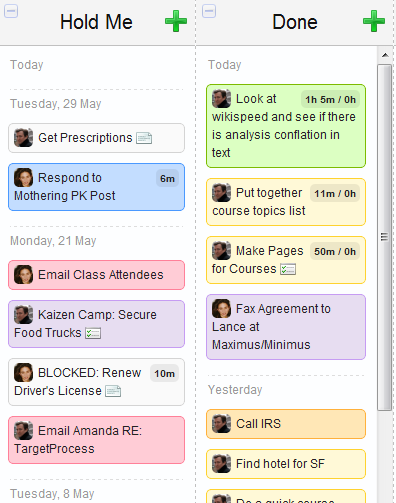
Very Nice!As you can see here, columns can be set up to record when something happened. In Personal Kanban this can be  useful specifically in “The Pen” (this month we’ve called The Pen – "Hold Me"). This is the column we use to track tasks that are waiting on an outside party for completion. Seeing when these tasks were put in this column is an extremely useful bit of information. First, it categorizes tasks neatly. Second, it lets us see  how long tasks have aged. Third, it shows us days where things have not progressed as we had originally foresaw.Today, for example, the task put in Hold Me on the 8th of May became too painful to look at. So after making this screenshot, I took a quick bit of time to take care of it. While I was at it, I assessed the other items in Hold Me, devised some quick fixes, and now the column only has three items in it. The discomfort of seeing 8 May at the bottom of the list was so great, I was compelled to act immediately.

Pomodoro Built Right In!

kanban flow pomodoro

Stats

work log

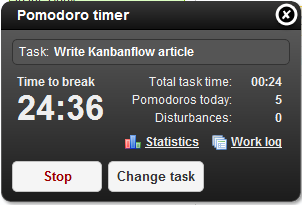
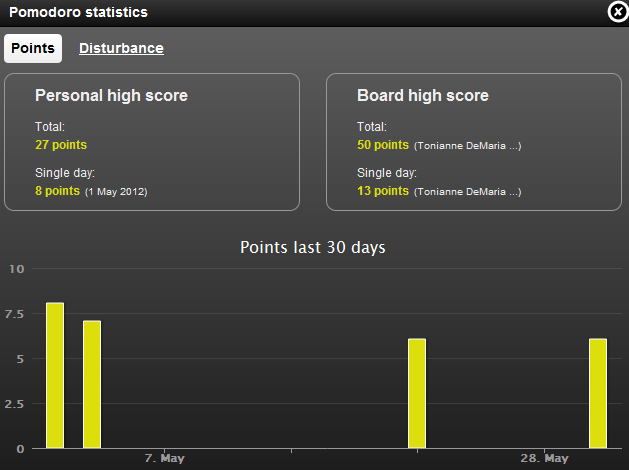
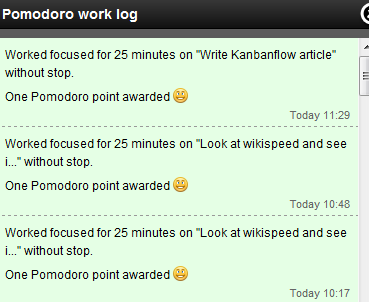
Look! There's a pomodoro timer build right in! The Pomodoro feature is clean and attaches itself to specific tasks. If you finish your task, you can move it into the DONE column and then easily select “Change Task” before you pull a new task into DOING. At the end of your 25 minutes of work, it alerts you to take a break and, if you’ve been good, you get a “pomodoro point.” The points let you keep track of completed or successful pomodoros. You can see that my day today has been miraculously interruption-free. I’ve done 5 successful pomodoros.If you are interrupted, it lets you select the reason for that  interruption, so  you can use that piece of information to complain later (and hopefully improve your process in the interim).KanbanFlow also provides statistics, competitive ones at that. Here you can see that my best day was at the start of May when I scored an impressive 8 points. Tonianne, however, is pulverizing me with her Olympic-caliber 13 points in a single day. (More than likely that was a day she didn’t have me interrupting her…)Lastly, we have the Pomodoro work log, which tells us what we worked on in a single pomodoro. Today I worked for 3 pomodoros (or excuse me, "pomodori") on a section for our upcoming Scrumban II book, then turned my attention to this blog post.When you combine these three pomodoro features, you end up with an unexpected bonus. Being able to tie completion times to actual work – and having that work interruptible and open for pomodoro break – that’s a godsend for busy knowledge workers.Plus, in integration of the Personal Kanban with the real-time Pomodoro timer really helps hold your focus on your Personal Kanban.

Adding Tasks is Not a Problem

adding tasks

Smile

exploding tasks

not expanded

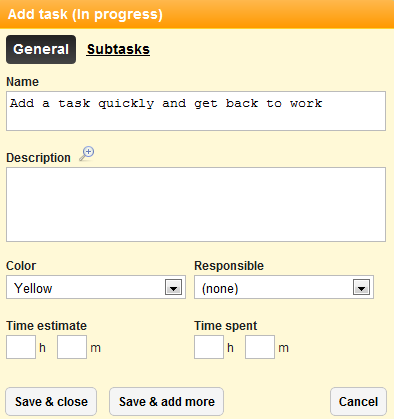
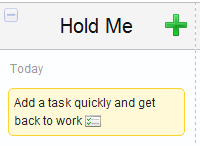
With KanbanFlow, adding tasks is easy. At the top of every column is a huge green “+” sign. Click on it and you get this lackluster yet powerful "Add Task" box.You can quickly add a new task and then click “save and add more” if you choose. You can set a color and the person responsible. You can even add a Time Estimate if you haven’t read our Why Plans Fail eBook   (which tells you why that might not be a good idea).More interesting here is the “Subtasks” area. Now, many on-line kanban tools have subtasks, so that’s nothing new. But this one is coupled with a setting in the columns of your kanban.You can set columns to “explode” these tasks when they get pulled in. So in the backlog, this task says, “Add a task quickly and get back to work.” But when we pull it into "IN PROGRESS" we get the column on the left.When the task enters this column the subtasks immediately become visible.This has allowed Tonianne and me to easily make tasks with minor steps or dependencies explicit. It’s also allowed us to pull in and work on joint tasks without having to break them down into ridiculously small chunks.

Print Feature

print feature

It’s so simple! You can print a column or columns of your board.This seems foolishly simple when you see it, but it’s extremely important to teams that want to meet to discuss items in the backlog, in process, or for a retrospective. It’s also pretty handy if you need to go run a bunch of errands. Think of it like am iPhone app...but on paper!

Our KanbanFlow Wish List

Anyone who has developed software knows that when you give customers what they want... they ask for more of what they want. This is certainly true for us. We’re really impressed with KanbanFlow – so don’t let the length of this wish list make you think otherwise.Tonianne says: I think we should put "really" in bold and in caps so people know we mean it.Jim says: Geez you're awfully demanding today. And don't give me the eyebrow. I can sense it's raised all the way from Seattle.So yes, we're REALLY impressed with KanbanFlow - so don't let the length of this wish list make you think otherwise.Also, we’re assuming many of these wishes will be repeated again and again as we write other reviews.

  • Shared Task Responsibility: Many tasks are undertaken by more than one team member. Having the icons or names for a specific person is great, now let us collaborate!

  • Add a Blocked Status: You can’t note that a particular task is blocked.

  • Create a Color Key: Users lose track of what the colors mean unless its written or communicated somewhere.

  • Individual WIP Limits: "In Process" limit should not be six, but should be 3 for Jim and 3 for Tonianne.

  • Swim Lanes: In every Personal Kanban seminar we have, people immediately and intuitively set up swim lanes. KanbanFlow needs them. Stat.

  • Archive: Once something is done, it just sits there. There needs to be an archive for tasks after they've been reviewed.

  • Pomodoro Additions:

    • Alerts: Tonianne would like me to know when she's mid-pomodoro so I don’t bother her. Tonianne says: Can I get a hallelujah? But what I'd really love to see is a tomato icon on the task I'm in the midst of working on so it'll serve as a visual cue not to disturb me. Maybe even an alert that pops up on Jim's screen that says which task is actively being pomodoro-ed.

    • Not an Interruption: Interruptions aren't always negative. Sometimes you just naturally end your tasks before the 25 minutes are up. We don't want to get penalized for this.

    • My Interruptions are Different: Allow me to enter my own interruptions.

    • “Start” when clicking “Break”: During a break, the start looks like you are “starting your break," not the next pomodoro. We’ve mistakenly started a new pomodoro many times.

That’s It!

That’s our take on KanbanFlow. We’ve really enjoyed our first month into it and are looking forward to the second.Tonianne grins smugly. See you in two months with the next Personal Kanban product review.

5s in Personal Kanban

Introduction

Personal Kanban is a great tool to visualize your work, to limit your WIP and to take better control of your life, either alone or together with your significant other, your kids or even your team at the office. In contrast to industrial Kanban, in Personal Kanban, the items contained in the value stream are often less defined and more often than not even the outcome is not clear. A "go shopping for dinner" task might be clear enough but you could as well end up checking the shelves in the supermarket and decide you prefer to get a Chinese takeaway instead.Nevertheless, if you have a Personal Kanban in place, customized to your own wishes and needs, suited for the way you like to work, things might or might not improve. After all, Kanban is only a tool, a method, and you still have to find the motivation inside you to make proper use of it. If you are so inclined, a simple Japanese philosophy might help you with this task.

5S

Like Lean and Kanban, 5S comes from Japan and is regarded as one of the fundaments for what literature named "Just-In-Time" production. It basically is a set of steps that streamline the way people work, eliminate waste and inefficiencies and help in reducing variation in the process. Of course, your daily schedule is not such a process but the basic idea of these five steps is still helpful. If you pay attention to them, your Personal Kanban will prove fruitful for you and you will reap the benefits. If you are reading this, chances are high that you already are, without knowing it.

Step 1 - Seiri

Seiri means as much as cleaning, throwing your junk away, and in a certain way, this is what you need to do when implementing your Personal Kanban. If you have used (or still use) different ways of keeping track of your tasks, get rid of them. No scribbles next to your keyboard, no sticky notes next to your phone, no random reminders in your mobile phone. Do a spring clean, if it's a task, put it in your Personal Kanban (the backlog, if it's for later on), if it's useless information, dump it. Make sure that there is only one place for you that contains all the information you need.

Step 2 - Seiton

Seiton means to bring things in order so you can use your Personal Kanban efficiently. It doesn't matter if you are using a big whiteboard, a table or your office door but whatever you use, you should have everything you need accessible. Stock up on post-it notes in different colours, have pens at hand, maybe even a filer so you can store your finished tasks for later. Whatever it is, you should not have to search for it when you want to work with your Personal Kanban, and the tools should neither be far away nor in an uncomfortable position. A corner in your room for example is a bad idea, as I guarantee that you'll lose your motivation if you constantly have to bend down to get a new post-it note.

Step 3 - Seiso

Seiso means to clean things or to shine them. This does not only mean that you should regularly take a cloth and scrub your whiteboard, if you have one, as noone likes dirt and dust. The bigger part of this means that you should keep your Personal Kanban tidy and in good shape. At the end of your workday, take a look at it, and ask yourself whether it is still a representation of your work. If tasks have become obsolete, then mark them as done. If you like to make notes to your tasks for later retrospectives, then now it's the time to do so. Rearrange what's left, reorder, make it look good. These minutes are not a lot of effort but if you start the next morning with a clean and up-to-date Kanban, you will feel better than if you had to start your day with cleaning things up first.

Step 4 - Seiketsu

Seiketsu is the task of standardizing things. Define for yourself a method for your Personal Kanban, and stick to it. If you use different colours or shapes for different kinds of things then be consistent with it. If you usually categorize doing your dishes as house chore, don't suddenly use a different category just because you couldn't find a post-it of the correct colour at hand. If you like to add deadlines to task items, make sure that each task with a deadline is marked accordingly. You want to be able to rely on the information your Personal Kanban gives you to make your decisions.

Step 5 - Shitsuke

Shitsuke means to sustain things and to be disciplined. Pay attention to the four steps above regularly. Use your Personal Kanban. Keep things clean and tidy, stick with the system you defined for yourself, restock on tools and whatever you need. And, above all: commit to what you are trying to achieve. Without discipline, your method will deteriorate over time and you'll gradually fall back into your way you worked before you introduced Personal Kanban. With discipline you will not only maintain but also over time improve your flow (through Kaizen), and you will have more often successful days when you see what you've done.

Conclusion

Most likely, all of the five steps mentioned above will sound obvious to you. For me, personally, they have formed a ritual and a mindset that help me maintain order and stability in my Personal Kanban, which leads to clarity and allow me to make the right decisions.

" "