" "

Kanban: A Universe of Options for Life’s Planning & Organizing Challenges #2

This is the second post in a guest series, Kanban: A Universe of Options for Life’s Planning & Organizing Challenges by Nadja  Schnetzler.

Visualize your work

When I talk about visualizing the work, and why this is beneficial, I usually start drawing a kanban board and to create a few post it's based on any project the participants are willing to invent or talk about. People usually are taken with the idea of showing „everything that could be done“ in the first column. It makes them really enthusiastic about the project. I then explain the basic flow through the board, starting with the most simple form (three columns, „to do“ „doing“ and „done“). There is really no explanation needed to show how the stickies flow through the board. It’s completely self-evident.

Make sure that the tasks are small enough

This is usually a very funny point. I try to bring it across, for example, with the task „organize client event“. Immediately, people can see what the problem is with this task. It contains a lot of subtasks and thus will not flow through the board easily. Also, it contains many different kinds of tasks that are suitable for different skill sets and different people, so it makes no sense to keep them all in one Post-it. We then proceed to creating a few subtasks for this bigger task, such as „get offers for catering“, „organize band“ or „rent a location“. This is also a good opportunity to talk about a concept of „definition of done“, usually resulting in a discussion about how a good stickie should be worded to be clear for an individual or for a group. It also becomes clear at this point that „small enough“ is something else for everyone. If we work alone, we can choose the size that works best for us, that allows our tasks to flow well through our board. If we work with others, we need to agree on how tasks should be worded and designed to work for everyone. In such a group setting, the need for a facilitating role in the team emerges very quickly.

Limit the stuff that is going on at the same time

Introducing the idea of limiting work in progress to increase throughput is not at all abstract if we already have a board we are working with. If I work with an individual, most people settle with one, two or (the very brave ones) three tasks that can be in the „doing“ column. If I work with a team, the team usually makes an informed guess about how many tasks can be in the active column for work to flow well. Here, I also introduce the idea of „inspecting and adapting“ the workflow and the WIP regularly.

For individuals, a great help can be to define the WIP according to the day at hand. If I have a huge task that absolutely needs to be finished today, my WIP is 1. If I have a ton of small boring stuff going on, it might be 3, just to keep me from falling asleep during one task and to allow me to do a little bit of „jumping from task to task“ if I feel like it. On the other hand, if I have a day full of meetings, my WIP again must be one, allowing me to not overestimate the stuff that I will get done during this day, and allowing for better predictions about how long tasks in preparatory column will be sitting there until they can be selected and finished. This is important for conversations with clients or with managers who want information or who want to push new tasks into our systems.  Having the „limit the stuff“ conversation is always an amazing moment in introducing kanban, you can really see people having their aha moment.

Communicate with yourself and with others regularly

A great benefit of a kanban board is that it serves as a conversation starter the moment you show it to other people. It triggers conversation because it’s so visual and because it is so self-explanatory. I always find it amazing how a team starts to talk about their work and their tasks in a completely new way just because they stand in front of a board. And the most amazing thing is that the conversation is more valuable and more rich from the first moment a team uses kanban. I think it has to do with the fact that the team is conversing on the same level, using the same tool and the same framework for the conversation, and this without having had extensive training, having read a manual or anything else you would expect when introducing a new way of working. It just, magically, amazingly, works.

Improve your system regularly

I am re-inventing my kanban board on a very regular basis. For one, because I get bored with the old one quickly, but also because I like my new kanban board to reflect what I have learned in the past. I adapt my columns, my stickie colors, the way I describe tasks on the stickies, but I also take care to create every kanban board in a way that motivates me for the next few hours, days, or weeks. I am happy to share a few pictures of different kanban boards I have been using. For me as an individual, improving also largely means adapting the kanban board to the context I am in. If I have a light week with only a few tasks, a simple paper with a few stickies for reference will suffice. But if my week is loaded to the last minute with task, I invest much more time in planning, describing and designing tasks, of course. Accordingly, the look of my kanban board changes. And there are even days when I do only use what I call a „mental kanban board“, one that is just in my head (which is unadvisable for teams, because it is no longer possible to communicate about the work with others).

I encourage teams to inspect their board very regularly in the first weeks of using kanban and to change the board often, improving it daily, then weekly. Then, when the team settles for a system, I encourage them to look at the state of the board (not just the WIP) at least once a month.

Do not over-engineer (as little as possible, as much as necessary)

When I work with people new to kanban I very soon (about half an hour into the training) encourage them to design their own board. It is pretty startling to see how soon people who are used to defining every single detail in their workflow get carried away with over-engineering their board. They start using six different colors for stickies, create complex swimlane systems. Introduce meta-layers of additional information that make it downright impossible to benefit from the kanban board in the way it should normally be the case: By seeing everything relevant at the glance of an eye.

I then try to reverse the system. I ask: „What would the most basic, simple kanban board look like that would still help you feel confident about your work and the tasks at hand?“

Once this is clear, the individual can then start adding additional layers of information to the board and the tasks.

Nadja Schnetzler was born in Switzerland and spent her childhood in Mexico City. After graduating from High School, she was a founding member of BrainStore, the first Idea Factory in the world. She has a bachelors degree in journalism from renowned “Ringier School of Journalism”. Over the last 25 years, Nadja has led over 600 innovation projects for companies like Nestlé, Siemens, the Swiss Railways, Kraft Foods, BMW, Save the Children, the United Nations or Amnesty International. She is the author of the book “The Ideamachine” (Wiley) and a sought-after speaker and lecturer at various universities.In 2012, Nadja founded «Word and Deed» with the aim at inspiring organisations, companies, teams and individuals. Word and Deed works in the areas of communication, innovation and collaboration. Kanban has become one of the most important agents of change for Nadja and her clients.Nadja lives in Switzerland with her husband and her two teenage kids. She enjoys listening to and playing baroque music (with her violin) and has an open house for people from all walks of life.This is the second post in the guest series by Nadja Schnetzler - Kanban: A universe of Options for Life's Planning & Organizing Challenges. You can read the first post here.
Kanban: A Universe of Options for Life's Planning & Organizing Challenges #1

This is the first post in a guest series, Kanban: A Universe of Options for Life's Planning & Organizing Challenges by Nadja  Schnetzler.About three years ago, I heard of kanban for the very first time, and it was love at first sight. When I drew my first kanban board for the team I then headed, I knew I was home.This just felt right and easy.

 From learning about kanban from a friend to the moment when I decided to try kanban for myself it took exactly 2 hours. I am a jumpstarter. I like to take quick and pragmatic decisions and I like to jump into the pool at the deep end. My team knew me well and they agreed to try this new method – at this point, the team would have been ready for pretty much anything, probably even witchcraft or voodoo, if it would help us increase our sales - (the company was going through a pretty rough patch at this time).

When I brought a whiteboard from a meeting room into the teamspace and started writing the columns - "To Do," "Doing," and "Done"- and started creating the first few Post-its with tasks, the members of my team looked up curiously from their work and gathered around the board, asking me what I was doing. I explained that I had just learned about this simple tool that would help us understanding our work and the way we collaborated better and to share better what we were working on. Amazingly, after just half an hour of talk, I had all 5 people on board and they were soon picking Post-its and moving them into the "Doing" column, prompting a conversation about how the work in progress of this team should be limited.

Kanban has entered all aspects of my life.

Ever since, I have used kanban in many variations for my personal work, in my family, in client projects and even in personal coaching sessions. Kanban, along with some other tools and methods (for instance the Pomodoro Technique), has completely changed the way I think about my work and the way I tackle pretty much everything I do. And because I like to share what I learn and know with others, my – quite playful and sometimes unorthodox – use of kanban has triggered many questions, reactions and even training inquiries by people in my network.

The benefits of kanban for me as an individual and for the teams I work with are amazing, and I often marvel at the fact that something as simple as a board with a few columns and colorful post its can completely change the way we collaborate, make choices and progress in our work.

Kanban is especially beneficial for the messy type of planner that I am. I was always hopeless at planning my whole day from 9 to 5 meticulously, and I was also particularly bad at sticking with one method. I am someone who gets easily bored, and I have to change the way I work often just to trick myself into paying attention. With kanban, it’s a bit different: I have been faithful to kanban throughout the last three years, but I redesign my kanban board every few days, sometimes weeks. This is great, because my work system stays the same but it’s look changes and this way, I am always motivated.

The notion of "inspect and adapt" goes well with this. My kanban boards have evolved over time depending on the nature of the work I do, the teams I work with or the people involved (my family, for instance).

Keeping the principles pure and simple.

The essential things that I talk about when working with other people are simple. The basic need of the people I coach and train with is to work better, to collaborate better, to go through change processes in a more stringent and clear way etc. I stick with the following principles that I lay out whenever I work with people who are new to kanban.

Setting up a new Kanban with these principals
Use these principals to set up a new Kanban

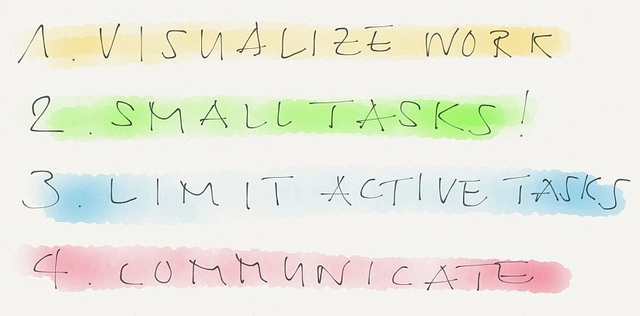
1.     Visualize your work

2.     Make sure the tasks you define are small enough

3.     Limit the stuff that is going on at the same time (limit WIP)

4.     Communicate with yourself and with others regularly

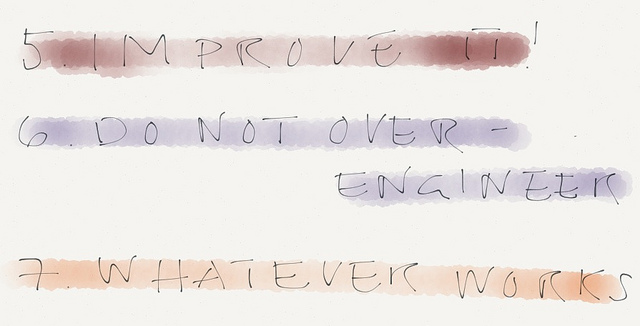
5.     Improve your system regularly

6.     Do not over engineer (as simple as possible, as complicated as necessary)

7.     Whatever works!

Nadja Schnetzler was born in Switzerland and spent her childhood in Mexico City. After graduating from High School, she was a founding member of BrainStore, the first Idea Factory in the world. She has a bachelors degree in journalism from renowned "Ringier School of Journalism". Over the last 25 years, Nadja has led over 600 innovation projects for companies like Nestlé, Siemens, the Swiss Railways, Kraft Foods, BMW, Save the Children, the United Nations or Amnesty International. She is the author of the book "The Ideamachine" (Wiley) and a sought-after speaker and lecturer at various universities.In 2012, Nadja founded «Word and Deed» with the aim at inspiring organisations, companies, teams and individuals. Word and Deed works in the areas of communication, innovation and collaboration. Kanban has become one of the most important agents of change for Nadja and her clients.Nadja lives in Switzerland with her husband and her two teenage kids. She enjoys listening to and playing baroque music (with her violin) and has an open house for people from all walks of life.

Doing GTD Kanban Style #3

This is the third post of a three-part guest series on Doing GTD Kanban Style, by Pascal Venier.After 7 years of implementing GTD, I have discovered Personal Kanban by chance and I have found that it offered an elegant solution to the nagging problems, I described in my previous post. Personal Kanban is a lean pattern which is as simple as it gets. It is based on only a couple of rules: (1) visualize your work and (2) limit your work in progress (or WIP). It is nevertheless extremely powerful. I am someone who is very visual and this is why I am so keen on Mind Mapping and other visual thinking techniques and I have always felt frustrated by the GTD system of lists. I have experimented for a time using a Mind Map for implementing Getting Things Done; it worked very well for the horizons of focus, but managing your Next Actions with a Mind Map quickly shows its limits. I eventually settled for using a great GTD task manager, Nozbe. When I discovered Personal Kanban I started by simply introducing a WIP limit to my Next actions and this considerably improved things for me. So much so, that I then tried to go further and went totally low tech by simply using a kanban board - in this case my office wall - and post-it stickies. I must say that the experience is very convincing.Personal Kanban has proven extremely powerful in helping me to manage better the flow of my work. Limiting your Work-in-Progress involved fixing a limit to the number of tasks you are undertaking at a given time. There is a limit to the number of balls you could be juggling with at the same time; it is likewise with the number of tasks you can execute. Limiting the WIP, the Work-in-Progress, does guarantee that the amount of things which gets your attention is limited. PK does introduce a clear constraint which is that items which are in your doing column must be completed, there is no way back, and this is the the end of endemic half-completed projects:  “stop starting, start finishing” as the famous Kanban slogan has it. This is incredibly pertinent to me as I have had in the past a strong tendency to start projects which then languish.  Limiting your WIP involves consistently applying filters, by establishing priorities. This allows for your Personal Kanban to help you manage very effectively your focus. You end up trying to do a lot less at the same time, but a lot more over time.

As Paul Eastabrook puts it: "Kanban has allowed me to increase the throughput of things getting done."Visualizing your work on a Kanban allows you to have at all time clarity on your work. It really allows you to have, so to speak, a conversation with your work. With the constraints inherent to the use of a Kanban board, reviewing the said board becomes almost inescapable. This is for the very simple reason that if you fail to do so, it becomes far too crowded, and since it is right in front of your eyes, you cannot avoid noticing it and feeling compelled to address the issue. Regularly reviewing your work becomes natural. A ritual stand-up which lasts a few minutes at the beginning of the day, allows you to take stock of your priorities for the day. The Weekly review is also your Kanban retrospective and it is enriched by the visibility of the work you have actually done. This often helps me realize that it consistently takes me a lot more time than I initially think to complete a given project or task. This has provided me with very valuable insights into whether or not it was pertinent for me to take on more tasks or projects, considering that what I can actually deliver is necessarily limited. I have found the concept of chain of value extremely useful as it helps concentrate the mind about the actual value of undertaking or not, specific projects or tasks. This is not all about becoming more productive, i.e. always doing more and more, but about being more effective, doing things which have a greater impact and which you find fulfilling.What I particularly appreciate as an experienced GTD-er is that Personal Kanban allows you to truly practice GTD without loosing anything from the method. This is a striking difference from most of the methods which have borrowed a lot from GTD, but have given a twist to it, which in fine results in an impoverishment rather than an enhancement. I am truly able to say that the more I use Personal Kanban, the more truly I practice Getting Things Done, because the two articulate seamlessly. I have come to see it as  the perfect complement to Getting Things Done. I see it as the “front-end” of my GTD system: the GTD workflow process helps you gain control, the Six-level horizons of focus help you to gain perspective, Personal Kanban actually helps you not only get things DONE, but to actually getting the RIGHT things DONE.

Doing GTD Kanban Style #2

This is the second post of a three-part guest series, Doing GTD Kanban Style by Pascal Venier.  You can read the third post here.In the first post, I have described how David Allen’s Getting Things Done allowed people to gain control of their workflows and at the same time get perspective on their work. This method has proved incredibly valuable to me over the last eight years. It nevertheless remains that making it all work is not always so easy. No matter how well GTD has been working for me, I have always had at the back of my mind that there was something missing in my implementation. For a time, I went through a phase of trying to find a technological solution to this problem. This involved trying more GTD software than I care to count, in search of the proverbial magic bullet. With time, I came to realize that this was pointless and went back to the fundamentals and came to the conclusion that there were two key issues I was struggling with in my implementation of GTD.The first problem I have been confronted is the sheer number of projects and Next Actions that ended up on my lists. This made me very aware that I was confronted with an overload of half-finished projects which were languishing and of tasks which were fighting for my attention. This was at times leaving me to feel overwhelmed and at times even slightly demoralized. The more I was becoming productive, the more I seemed to be faced with  endless projects and tasks. GTD is meant to be the synonymous with “stress free productivity”, but it seemed that if I was not very careful, the stress could can creep back through the the back door. Indeed David Allen does make a distinction between "active projects" and passive ones for which the someday-maybe list provides a "parking lot", but in practice in a busy life, it is difficult to juggle all the obligations one has to face. The switch between what should be active and passive projects is in my view one of the most crucial issues to an effective GTD implementation, but also perhaps one of the hardest to nail down.The whole method is designed with one end in mind: getting things DONE. Yet, it is no little paradox that when there are two crucial frameworks which help getting control and getting perspective, there isn't anything as simple and powerful about the DOING part of GTD. The absence of a straight forward process to help you focus and actually take actions is often felt by GTD-ers.  Paul Eastabrook has very aptly identified this issue, in one of his posts on this blog. As he puts it, "GTD can lead to thrashing, when the total number of options for doing is enormous." Of course we must acknowledge that Next actions are not simply traditional tasks on a task list, but precisely this: the next action to be taken in a given project. Nevertheless, in my experience, a delicate issue remains how to choose which next action will be performed at a given moment. The only guidance provided by the GTD method in this respect is that there are three ways to choose the actions at a given moment. Firstly the context, and what can be done in a given environment. Second, the time available which greatly limits the next actions which can be executed.  Finally, the energy available at a given moment must also be taken into account: there is no point in attempting to undertake demanding tasks when one is very tired. I have often felt that the absence of better way of prioritizing and limiting what could be done at a given time was a problem. A natural tendency seems to be that the smallest and easiest Next actions were undertaken, following the line of easier passage.Such are the two crucial issues I feel I have been confronted with in trying to take my GTD implementation to the next level. Discovering serendipitously Jim Benson and Tonianne DeMaria Barry’s Personal Kanban: Mapping Work | Navigating Life has however given me an opportunity to find an elegant solution to address these issues, by simply adding to the equation this lean pattern which simply involves 2 principles : visualizing and limiting one's Work in Progress (WIP), as I will explain in my next post.

Doing GTD Kanban Style #1

This is the first post in a three-part guest series, Doing GTD Kanban Style by Pascal Venier. You can read the second post in the series here.When Jim Benson encouraged me a while back to write something about how I am combining Personal Kanban & Getting Things Done, I thought this was an excellent idea. This was the more so as it was extremely timely for me to pose and reflect on my experience, 8 years after starting to implement GTD, and about a year after discovering Personal Kanban. I started drafting a blog post on how in my experience they play extremely well together. However, what was initially intended to be written in the form of a single post has irresistibly grown into a series of posts. In this first post, I would like to start by describing Getting Things Done and what it involves.

Getting Things Done: the Art of Stress-Free productivity is the title of a book published at the very beginning of the last decade by David Allen, a personal productivity consultant and speaker based in Ojay, California. It has quickly become a best-seller and has rapidly drawn a huge following. It is now one of the classics of the personal productivity literature. The purpose of the GTD method is to help people becoming more productive by gaining control of their workflows. This is achieved by implementing a simple 5 stages process - “a phenomenal piece of mental artistry” in the late Marc Orchant’s words - which involves collecting, processing, organizing, review and doing. As an image is worth 1,000 words, the processing system has been elegantly synthesized in the now famous GTD Workflow diagram and more recently as a cool infographics, the GTD workflow map.A first basic principle is to be quite systematically collecting not only all the “stuff” coming into your life (letters, documents, emails, etc.) but also emptying your head and writing down everything that has your attention.It is then a matter of quite systematically processing all the inputs coming in your system. This triage process uses simple yet effective filters by asking three questions: “what is it?”, “is it actionable?” and if it is actionable, “what is the next action?” ; determining what is the next action is quite central to the whole system. A particularity of GTD is that anything involving more than one action is a project.Organizing involves using a very clear structure and “clear buckets”. Items which are not actionable are disposed of (trash), set aside to incubate (someday-maybe folder) or stored for future retrieval (reference materials). A simple system of lists and folders is used to keep track of actionable items (next actions, time sensitive items and events, “waiting for” items which have been delegated, as well as projects and projects support materials).Systematically reviewing the system on a regular basis is essential to the implementation of GTD. This involves reviewing constantly what Next Actions need to be executed, but also conducting ritual weekly reviews in order to process the in-box, take stock of all the open loops, Next Actions, projects, and keeping them aligned with one’s areas of responsibility and focus and your longer terms goals and vision.Finally, it is a matter of doing, for in the end this is all about Getting things DONE. A key here is that a lot of what will be involved will consist in predefined work, whilst keeping enough flexibility for being able to be responsive to what may come up and need immediate attention.If Getting Things Done is about becoming more productive, it is in no way a matter of simply keeping your nose to the proverbial grindstone, far from it. It also involves another dimension, alas for too often neglected or misunderstood, which helps taking things to the next level, by going beyond productivity and striving towards effectiveness. Gaining perspective is quite crucial to this end and the Getting Things Done method also involves a second framework, the six-levels of the horizons of focus. This is a matter of looking at your work bottom-up, starting from the ground up, from the runway, i.e. the Next Actions you need to accomplish, and rising progressively in order to get an eagle-eye view of what you are doing and would like to do in the future, right up to you life values at 50,000 feet. The six horizons of focus include:

  • 50,000 feet : Life purpose

  • 40,000 feet : vision of long-term success (3-5 years)

  • 30,000 feet : one-to-two-years goals

  • 20,000 feet : current areas of responsibilities

  • 10,000 feet : current projects

  • Runway : current next actions

These six-levels allow you to map what you are currently doing to make sure that they are aligned with your goals and vision for the future, but also all importantly atoned with what you see as your Life purpose.Over the last eight years, practicing the GTD method has proven incredibly valuable to me. I would like in my next post to reflect on my experience of trying to make it all work and identify some of the recurrent challenges I have been confronted with, before looking at how Personal Kanban has helped me take my GTD implementation to the next level.

" "