" "

Clean Up The DONE Column

post5

You have my word that after this post, there will be no more memegenerator pictures..

How do you know when to clean up your DONE column?When it is full.I mentioned in our first post in this series that we were showing our board to people in classes and on consulting engagements. The DONE column showed that we were really really productive. It was huge. It went on forever. Hundreds of completed tasks.So, how do we clean up our DONE column?

Retrospective

Every Friday we meet and discuss what we’ve been doing and move the tickets from DONE into an archive column. For a physical Personal Kanban, this might be a box or a folder. We discuss what we did and how things went, focusing on areas of improvement.But what happens if you are on the road for four weeks straight and you can’t have a retrospective?This was happening a lot.

Not Everything Needs to be DiscussedRecently we have discovered that focusing on one or two main projects at a time, the retrospectives change considerably. We set up tactical boards for daily work and focus on that work. We are constantly asking ourselves what needs to be done, how our process is working, and what the best thing is to do next.The DONE column still fills up with tasks, but now we understand the nature of these tasks. We are also starting to flag improvement ideas to discuss. We now pull those tasks in real time, as opposed to waiting for a retrospective. So Tonianne might come up with a few improvement tasks and we’ll discuss them the next morning.This frees us up to archive routine or comfortable tasks when the DONE column starts to fill up.This is the fifth post in the series - Are You Just Doing Things.  You can read the previous post here.Written in Mesa, Arizona
Dominant and Secondary Projects

At Modus we now have a posted, dominant project at all times.

Make dominant projects visible

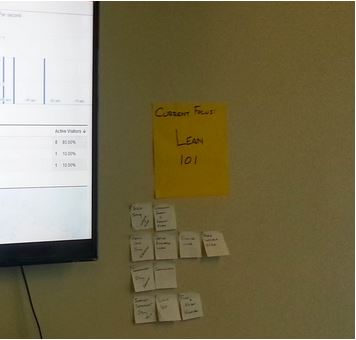
We post it as a large sticky on the wall. This is the banner saying “If you pull something and have any choice whatsoever, pull it from this backlog.”

This giant kanban token conveys our current organizational focus and promotes completion of that project.

Only when something is completed, does Modus receive any value from it.

This is why long projects with cumbersome deliverables are so difficult for companies and the people in them: long projects require long wait times to realize value.

As the anticipation for completion builds and we meet the inevitable disruptions in schedule, we are disappointed. As we are disappointed, our desire to work, our culture, and the quality of our work suffer.

Providing a constant reminder with a visual control, not just at the standup meeting (which is not a visual control), of the day’s focus has helped considerably.

I’ve noticed that Urgent but not Important tasks like answering emails, dealing with texts, and impromptu conversations not only derail us from the task at hand, but also the day’s focus. I’ve witnessed in others and myself that when we’re interrupted, we often don’t go back to what we were working on, but onto another interruption. After an unexpected phone call, we might suddenly find ourselves checking e-mail.

It seems that any break in flow, breaks the flow.

The visual reminder of major focus helps return us to the day’s project.

This is the fourth post in the series - Are You Just Doing Things.  You can read the previous post here.

Written in Mesa, Arizona

Clean Up Your Backlog

post 3

Does your READY column look like a junk drawer?  

Do you have tasks in there that you are holding onto from six months ago that say “Urgent!” (and have since the day they were created)?

Guess what? You’re learning something about your work.

We have a lot of urgent tasks that strangely don’t get done and no one gets hurt.

Busy-ness is bad for business

We might miss an opportunity or need to do something different in the future, but we don’t complete a lot of tasks we, ourselves, would describe as urgent.In the first post in this series, I mentioned that at Modus our board had built up an unhealthy backlog. It was gigantic.Why did this happen?1. We’re busy! Tonianne and I were traveling constantly, forming partnerships, coming up with new products, working on existing products, keeping notes about things to blog about, juggling demands from clients, and running a business. We were both constantly adding to the board. So much so, Tonianne at one point created a backlog just for her because she couldn’t find things on the board. Busy-ness was becoming bad for business.

2. No custodian No one was in charge of cleaning out the backlog, so even though we are both focused on the board, we became focused on completion - but not hygiene.

3. Focused on the new work As I mentioned we were focused on completion. We would put new urgent work into the board and do it immediately, while old tasks just got older. We needed to maintain a focus, again, on board hygieneSo what to do?Well, we can either clean them up or work them out.Cleaning I took on the role of custodian and started clearing out old, poorly described, or simply unnecessary.  After that, and the backlog regrooming from the previous post, we were able to see all our work and begin to actually complete. When discussing the board, we now talk about old tickets and why certain tickets are there.Batching If there are tickets that really are important, but haven’t been done, we might suggest a pomodoro or two to focus on completing just those tasks, clean them off the board, and move on.This is important because often tickets that languish are of a certain type. They involve writing tedious emails or calling people on the phone, for example. Batching those up and completing them also is a good way to get them out of the backlog.This is the third post in the series - Are You Just Doing Things.  You can read the previous post here.Written in Mesa, Arizona
Categorizing Your Backlog

post 2

Your backlog is hope. Your backlog is pain.  

Your backlog holds all the projects, tasks, demands, desires, and expectations you have and the world has for you.The problem is, today’s apparent emergencies are tomorrow’s waste-of-my-time.If we are focused on completion, we don’t want to complete tasks.We want to complete products.If you find you are completing tasks, but not products ... try making your backlog explicitly show what you need to do to complete the products those tasks make up.

Unorganized Backlog

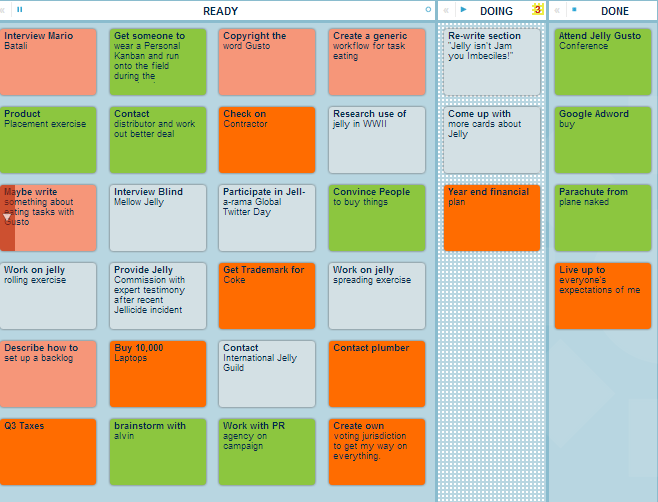
This board is a typical cluttered backlog. You might be able to see that tasks belong to specific projects, but they are jumbled and incoherent. While each of these tasks might be options we can exercise, the complexity of our decision of what to pull next is directly related to the number of tasks in the READY column and our inability to quickly see what each task is.So .. let’s try to build an explicit BACKLOG before the READY column:

Explicit Backlog

Here we see a board with a categorized backlog. We hold work in the backlog until it’s READY to be done. Only then can we move it into the READY column. Note here that the READY column is limited to seven tasks.So now we’ve split out our work and we can see very clearly what projects we have, how much work is in each, and what we are currently spending our time on.This board is much easier to interpret.In this example, we can see that we are split between marketing, general work, and course creation.This is the second post in the series - Are You Just Doing Things?  You can read the first post here.Written in Mesa, Arizona
Are You Just Doing Things?

bp1

I’ll bet you have a lot of things to do. 

Of course you do.We all do.A Personal Kanban anti-pattern that I’m seeing is that people are filling their kanbans with things to do and then...doing them.They are becoming productivity machines. And that’s...really bad.Look, there’s a limitless amount of things to do and you can become super efficient and do much more of them than you ever dreamed possible. And if you do that, soon you will burn out.So I ask you, Why not figure out which work is important?This happened to us recently at Modus. We had our board which we’d been using for a year. The backlog was filling up with tasks that could be done, but didn’t necessarily need to be done.At client sites and in classes, we frequently use our own board as an example. And our board clearly showed this anti-pattern.So we did a few things that I will recommend today:1. Categorize the Backlog - We divided our backlog into sequestered categories of projects. This helped us see where projects were in their completion and what areas of work were taking up most of our time.2. Clean Up the Backlog - Clean up the backlog by deleting old tasks that have aged out or that people want to care about but don’t really care about.3. Pick Dominant and Secondary Projects - One project at any given time should be your main focus. There will always be immediate, context-specific, daily tasks you need to do - but one project should be focused on and completed. Secondary projects are those which need to be done, but are either not the immediate focus or are supporting that focus.4. Clean Up the Done Column - Done columns can fill up, especially when we are hyper-productive. Soon we have our boards laden with stickies covering each other and we don’t know what we did, when we did it, or why we did it that way. Dirty done columns are worse than to-do lists.What you might notice in these four steps is that we didn’t prioritize our tasks, we didn’t make big plans, we altered the board to flow better and our the relationship to the work to be more focused.In the next four posts, I’ll talk more about each one in depth.Written in Mesa, Arizona

" "