" "

Personal Kanban: Integrating Evernote with LeanKit using Zapier

Continuing our series of Personal Kanban focused integrations for LeanKit, let’s take a look at integrating Evernote with LeanKit. Say you’re in Evernote, and you want to quickly add a card to your personal kanban board in LeanKit.  With this integration, you can simply add “(LK)” to the note title, and BAM! LeanKit card.

Creating a new Zap trigger from Evernote

Authorizing Your Evernote Account

Set up LeanKit Evernote Accounts

Configuring LeanKit Fields Evernote Title and LeanKit Card Title
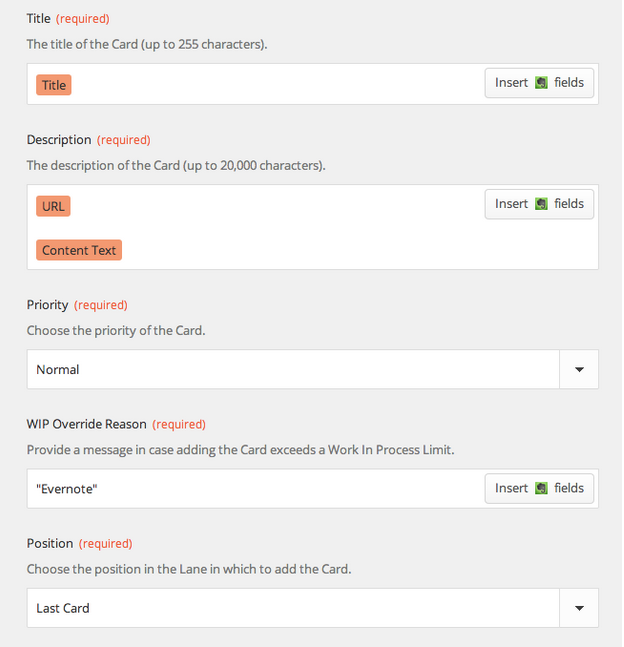
Adding Evernote URL field to LeanKit description field

Creating a New Note in Evernote

Test and Naming the Zap

New LeanKit card

URL to the original note included in leanKit card

As in our other integrations, we’re going to use Zapier.com to connect Evernote and LeanKit.Create a new “Zap” using the “New Note” trigger from Evernote with the “New -Add Card” action from LeanKit.Zapier will prompt you to authorize your Evernote account:After setting up your LeanKit and Evernote accounts,You can now configure the trigger for evernote. I chose to add a filter on the note title. In any notebook, I can add “(LK)” to the note title and have a LeanKit card created for that note. I could have chosen other options here, and you may decide you’d like it to work differently. For exaple, you could create a separate notebook in Evernote, and just have all notes from that notebook get added to LeanKit as cards. Or you could use the “tags” in evernote instead of the title, like I did.Now configure the LeanKit fields, including the Evernote Title in the LeanKit Card Title field.I also added the Evernote “URL” field to the LeanKit Description field, to provide me with a link back to the original note.So, to test this, create a new note in Evernote, with “(LK)” in the note Title:Then test and name the Zap you’ve created:And you should get a new LeanKit card, as shown below:You can also see the URL to the original note included in the description of the LeanKit card:Enjoy!This is the third post in the series by Chris Hefley of LeanKit showing how to integrate tools many of us use everyday with our Personal Kanban. You can read the previous post - Personal Kanban using Google Calendar, LeanKit and Zapier here

Personal Kanban using Google Calendar, LeanKit and Zapier

This is the second post in the series by Chris Hefley of LeanKit showing how to integrate tools many of us use everyday with our Personal Kanban. You can read the first post - Killing Email Interruptions: Personal Kanban using LeanKit, Gmail and Zapier here.

This time, we’ll look at how to integrate Google Calendar with LeanKit via Zapier.com. We’ll look at two different ways to use Google Calendar and LeanKit together.

Creating a Zap Trigger

Setting up GCal with LeanKit

Search Term for GCal Trigger

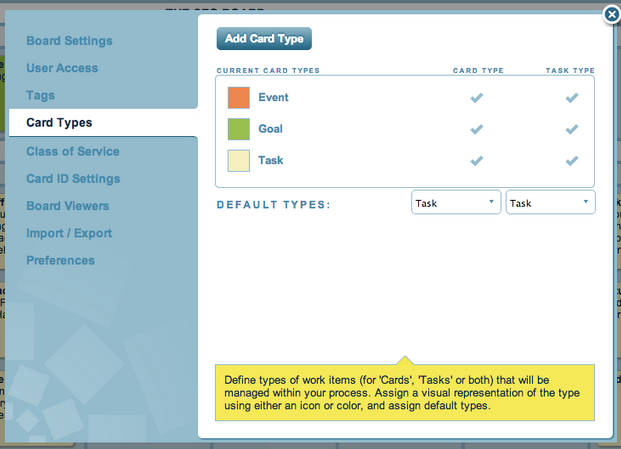
Creating a new card type in LeanKit

Matching GCal event to LeanKit

Adding Summary and Event Fields to LeanKIt Description Field

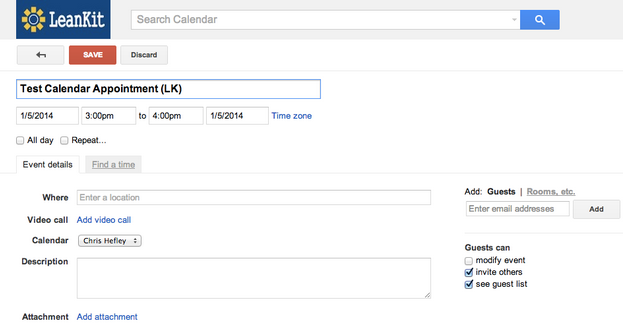
Creating an Event with LeanKit in the Event Title

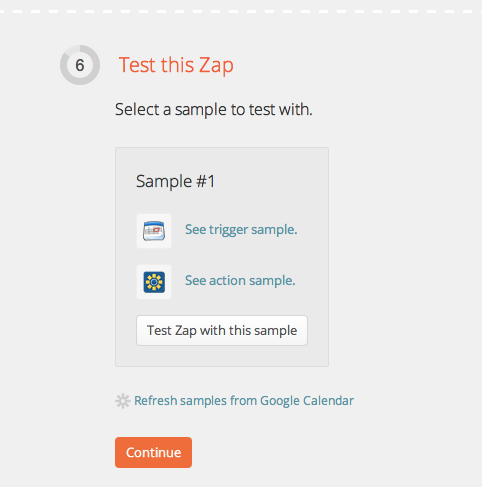
Testing Zap

New LeanKit card on Personal Kanban board

Alternative way to add event cards to your board - Event Start Trigger

Setting up new trigger parameters

New Calendar Event Setup

Testing and naming the new Zap

New Event Card on the LeanKit board

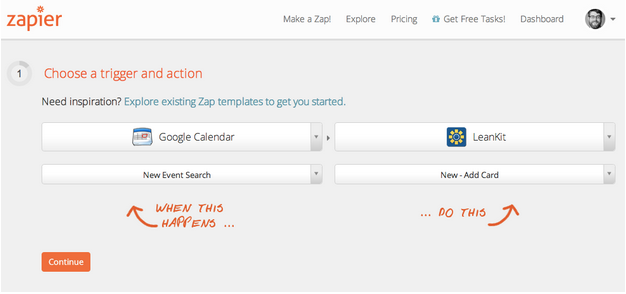
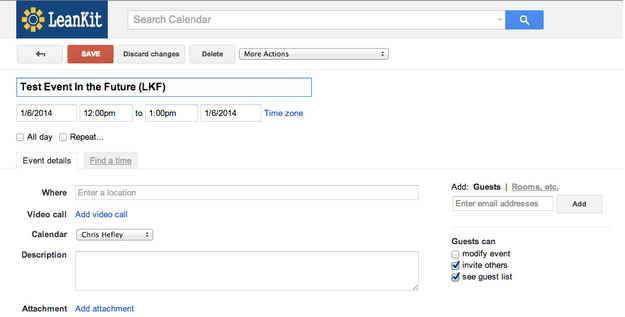
First, let’s create a “Zap” based on the Google Calendar “New Event Search” trigger. This will allow to create a Google Calendar event and a corresponding LeanKit card at the same time.Zapier will prompt you to set up your Google Calendar account and you can use your already set-up LeanKit account.After setting up the accounts, set the Search Term for the Google Calendar trigger. I used “(LK)”. If I create an event with “(LK)” in the title, this integration will create a LeanKit card for that event. That way, I can easily control which events from my calendar get a card.Now, I want to create a new card type on my LeanKit board, for “Event”.Now that we’ve taken care of that, we can set up the target LeanKit board, lane, and card type.Use the “Summary” field from the list of fields available from Google Calendar for the LeanKit Card Title field.Not all my calendar appointments actually have a description. Since Description is a required field in the LeanKit integration, add the “Summary” and “Event Begins (Pretty)” fields to the LeanKit Description field, in addition to the Google Calendar Description field, as shown below:We’re nearly ready to test the integration. First, though, let’s go to Google Calendar and create an event with “(LK)” in the event title:Finally, test and name the Zap:And you should get a new LeanKit “Event” card on your personal kanban board:There’s one other way I’d like to integrate my Google Calendar with LeanKit. I’d like to create a new card on my LeanKit board one day before a scheduled event, instead of immediately when I first create the event. So, if I’m using my personal kanban board to keep track of things I have to do on a given day, I will get the next day’s events added the the board each day.For this integration, I’m going to use the “Event Start” trigger from Google Calendar.When setting up the trigger parameters, I chose 1 day, and used the Search Term “(LKF)” (for “LeanKit Future”). The Search Term is optional, if you want this trigger to fire for all events.For the LeanKit parameters, set them up the same as in the previous example, then create a new Google Calendar event. The event needs to be in the future, within 24 hours of the current time in order for our test to work. And I’ve added “(LKF”) to the event title:Test and name this Zap:...and we should now have a new Event card on our LeanKit board:There you go! Now you can create a card and event at the same time, or mark a calendar event to have a LeanKit card created in the future, when the event is 1 day away.

Kanban Seder

Seder Kanban

Last week my wife and I hosted a Passover Seder. We have entertained together a number of times, but this was the first real attempt at a coordinated, sit-down meal. Most of our gatherings have been buffets, and less dependent on timing.We knew getting the timing of the Seder right would be a challenge. The meal is served in the middle of the Seder, not just when the guests arrive. We also knew there would be a lot of uncertainty. Potatoes don’t always cook the way you want them to, and guests never arrive all together. It would be difficult to plan everything perfectly. However, we knew we would both feel a lot more comfortable if there was a plan, to help keep us on the same page when we started making adjustments… and we always have to make adjustments.The night before the Seder, we went through all the things we’d have to do. We’d used Kanban-style visualization techniques before (to pack for trips and track jobs around the house), and there are three cabinets in our kitchen that work great as Ready, Doing, and Done lanes. So at first I started listing out each major task on a sticky note, but I quickly felt this would be inadequate.Time was an essential component of everything we had to do. We couldn’t just pull tasks when we were ready. The brisket had to cook for hours; potatoes had to be peeled and seasoned before going in the oven; matzo balls had to chill before going in the water to boil; and different things had to be ready at different times, paced to the rhythm of the Seder. Coordinating the timing of each task was one of the main reasons for our planning exercise.The solution we used was to write the time required for each task on the upper right of the sticky note. This allowed us to get a good picture of the overall flow. Working backward from the end, we started to determine when we wanted each task to complete. We also recorded that information on the sticky notes. Finally, through a little quick subtraction, we determined the times we needed each task to start, and put that on the sticky notes. We tried to keep our number of concurrent tasks low—thus limiting our work in progress—by staggering tasks where we could. Once this was done, we had a plan. We went to bed, comfortable and confident.The next morning, things started to go awry. The Seder’s co-host, who was expected to arrive early to help with the preparations, had a family emergency and couldn’t come. This was a significant problem. The plan had assumed she would be there. She was also bringing the Haggadah, so my wife started looking for alternatives online, a task we hadn’t anticipated, and one that took a long time to complete.The brisket pan turned out to be too large for the meat and its sauce. At some point, all the sauce cooked down and started to burn. We caught it in time, but reworking the brisket dish in the middle of the other preparations was an emergency we hadn’t counted on.But our visualizations were resilient. We were able to absorb these unforeseen issues into our plan without disrupting our overall flow. One reason for this was the slack we’d built in the night before. We had arranged the plan to keep the number of concurrent tasks low. This helped. The act of planning had also allowed us to see what needed to happen at specific times and what could be flexed. To make up for the time and hands we’d lost, we started pulling flexible tasks ahead when we had a little slack. Having the start time on each task made it easy to identify what to do next; when either one of us came free, we could grab it and get started. The visualization also allowed us to talk about what we were doing and where we were with it. We didn’t have to waste time talking about what to do next and could quickly help each other when necessary. The Kanban was our shared view of our work, an effective distributed form of cognition.The final result was a fun Seder, an excellent meal, and nearly perfect timing, in spite of the inevitable hiccups. Our Kanban Seder was wonderful, and I’m looking forward to doing it again next year.Follow me on Twitter.

Is Your Project in Limbo?

Limbo is completion out of reach

What happens when we start a project and it is honestly overtaken by events?We start a project in good faith and then, because context changes, we have to set it aside. It’s work-in-progress, so what do we do? The project isn’t done, we will likely come back to it, but it could be weeks or even months before we touch it again.These projects Limbo projects - we are unclear when they will start again, we only know that we’ve started them and that they are no longer our priority.  We are moving the project from being active to being just another option that may or may not be exercised in the future.Some people who are, shall we say, really into their Personal Kanban will lose sleep over this. But one word of (hopefully) enlightenment - Personal Kanban is more about understanding our work than it is getting specific things done.So, we now understand that we have a project that is either in Limbo or getting close to Limbo.Ask a few key questions as soon as possible and with as many people involved with the project as possible:

  1. Limbo Really? Is the project really in Limbo or are we simply being distracted by something else? (Make hard, but informed choices when interrupting a project).

  2. Quick Payoff? Can the Limbo project be focused on and quickly completed? (Even if you greatly reduce the scope of the project, can you quickly realize some benefit from the work done thus far?)

  3. Future Knowledge? If you are putting this on hold, what will you need to know in the future when you start up again? Write a note to your future self about the state of the work, why it is that way, and the location of any half-completed work.

  4. How Could This Happen to Me? Be very critical of why this project was allowed to start, only to be abandoned. Abandoning a project is very expensive and very wasteful. Figure out why this happened and take steps to avoid it in the future. Limbos cost money.

Again, Limbos are going to happen. They happen to everyone. Since our contexts and priorities change, it would be foolish to expect that every project we start on will be completed. The goal here is to use the Personal Kanban to understand our work, recognize when a project is in Limbo, and to act responsibly.Seattle, WAPretty Awesome Image: http://ichigopaul23.deviantart.com/art/My-Limbo-Wallpaper-364369944

You Are a Role Model

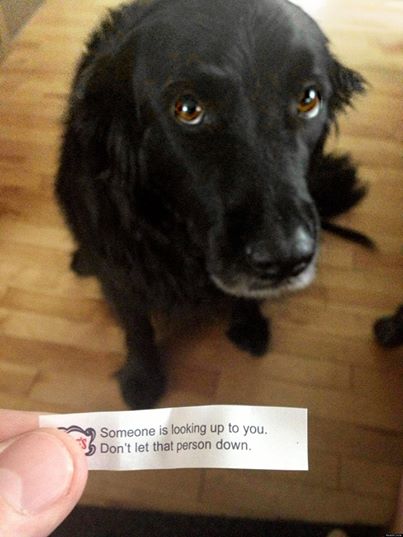
fortune

At some point, maybe at many points, it strikes me that we are all role models. We all influence each other. We are a network of emotions and actions.

When we do something, positive or negative. Kind, indifferent, or cruel. Self-centered or altruistic. Other people notice. Other people react.

This is systems thinking in the social sphere. Social media is a social system. We have seen how they can be built, enjoyed, and exploited. Work, home, friends are also social systems.

I’m not going to go into any false spiritual spiral with this, I’m just going to note that there are systems in which we operate. Personal, political, economic. At home and at work. And how we act, how we present ourselves, how we interact with others - makes a hell of a difference.

In the 90s, before New York City became mysteriously friendlier, I woke up one morning in Tribeca. I went for a walk with my friend Brian. We went into a shop to get some coffee. Brian was animated and talkative, but when the person came to get his order the exchange went like this:

Person (aggressively staring at Brian): What d’you want?

Brian: (looking away, like the other person isn’t there): Coffee.

He gets Brian his coffee.

Person: Here.

Brian: <no response, grabs coffee>

Person to me same thing: What d’you want?

Me: (Looking back at him, smiling) I’d also like a coffee, please.

Person stares at me a second, trying to figure out if I’m for real.

Goes to get coffee.

Comes back and hands it to me.

Me: Thank you.

Person walks away.  Stares at me.

Brings me a muffin.

Person: ... You have a nice day, okay?

Me: Really?

Person: Really. <Person then smiles back>

My friend Brian was one of the nicest people on earth. But in the 90s New York system, he was expected to act a certain way. On my part, I didn’t do anything hokey or over-the-top, I was just not unpleasant.

Brian said, “I’ve never seen that guy be nice to anyone.” I was a role model, just by being human. It doesn’t take much.

When we get overworked, we get stressed. When we get stressed, we get unpleasant. When we’re unpleasant, we behave unpleasantly. We we do that, we spread it around.

So, I’m not saying “be nice all the time.” What I’m saying here is that if we build our systems to avoid overwork (likely one of the largest sources of stress we have), we are improving other systems we engage in because we will be better actors in those systems.

So recognize that you are a role model. You are an active part of many social systems.

Blogged on the Riverwalk in San Antonio, Texas

" "